Images are everywhere online. They make websites more attractive, help tell stories, showcase products, and capture attention in ways that plain text never can.
From blog posts and online stores to social media platforms and business websites, images have become an essential part of digital communication.
But there is a problem that many website owners overlook.
Images are often the largest files on a webpage. Large images can slow down loading speeds, frustrate visitors, hurt search engine rankings, and increase bandwidth costs.
In today’s fast-moving digital world, people expect websites to load almost instantly. A slow website can drive visitors away before they even see your content.
This is where image optimization becomes important.
Image optimization helps websites load faster while maintaining excellent visual quality. It is one of the simplest and most effective ways to improve website performance, boost SEO, and create a better experience for visitors.
In this guide, you will learn what image optimization is, why it matters, and how you can optimize your images like a professional.
What Is Image Optimization?
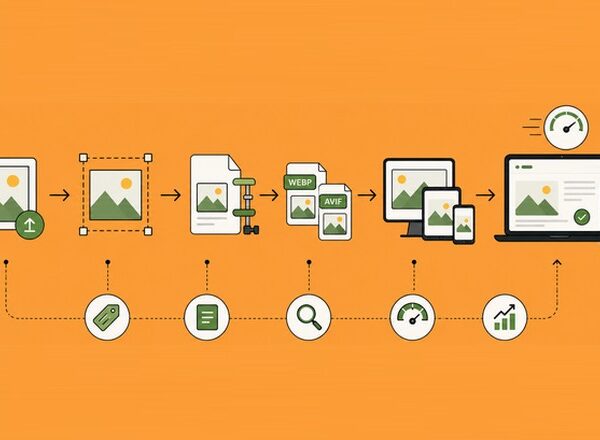
Image optimization is the process of reducing image file sizes while maintaining the highest possible image quality. The goal is to make images load faster on websites without creating a noticeable loss in visual appearance.
Properly optimized images help improve website performance, reduce bandwidth usage, and create a smoother browsing experience for visitors.
It is one of the most effective ways to speed up a website while still delivering sharp, professional-looking visuals across desktop and mobile devices.
The goal is simple:
- Make images load faster.
- Use less storage space.
- Reduce bandwidth usage.
- Maintain visual quality.
- Improve website performance.
Think of image optimization like packing a suitcase for a trip. You remove unnecessary items to make the suitcase lighter and easier to carry. Image optimization removes unnecessary data from image files so they can load faster online.
An optimized image looks almost identical to the original version but takes up much less space.
Why Image Optimization Matters
Many website owners spend countless hours improving content, designing pages, and building backlinks while completely ignoring their images.
That can be a costly mistake.
Image optimization affects several important aspects of a website. Large, unoptimized images can slow down page loading times, negatively impact user experience, and make visitors leave before they engage with your content.
Search engines also take website performance into account, meaning poorly optimized images can indirectly affect your visibility in search results.
By investing a little time in image optimization, you can improve both the technical performance and overall effectiveness of your website.
Faster Website Loading Speed
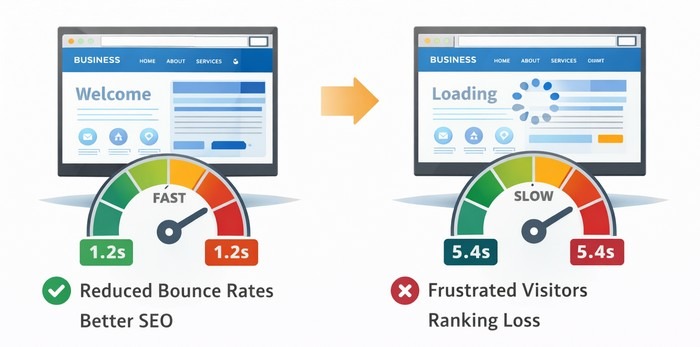
Website speed is critical.
Research consistently shows that visitors abandon slow-loading websites. Every extra second of loading time can reduce engagement and conversions.
Large images are often the biggest contributor to slow page speeds.
For example:
- Original image: 5 MB.
- Optimized image: 400 KB.
The visual difference may be almost impossible to notice, but the loading speed improvement can be significant.
Faster websites create happier visitors.
Better User Experience
Nobody enjoys waiting for images to load.
Visitors expect smooth browsing experiences on desktop computers, tablets, and smartphones. Slow-loading visuals can quickly create frustration and cause users to leave a site before engaging with its content.
A fast and seamless visual experience helps build trust, keeps visitors engaged longer, and improves the overall perception of your website.
Optimized images help:
- Pages load quickly.
- Content appears faster.
- Reduce frustration.
- Improve navigation.
A fast website feels more professional and trustworthy.
Improved SEO Rankings
Google has confirmed that page speed is an important ranking factor.
Search engines want to provide users with the best possible experience. Faster websites often perform better in search results.
This means that improving load times through image optimization can directly support your SEO efforts. A faster website not only ranks better but also keeps users engaged once they arrive.
Image optimization contributes to:
- Faster page speed.
- Better Core Web Vitals.
- Improved mobile performance.
- Better user engagement.
All of these factors can help support stronger search rankings.
Better Mobile Performance
Today, a large percentage of website traffic comes from mobile devices.
Mobile users often browse using slower connections than desktop users. This makes performance even more important, as delays can quickly lead to users leaving a page.
Optimizing images for mobile ensures faster load times, lower data usage, and a smoother browsing experience across all types of devices.
Large image files can become a major problem on mobile networks.
Optimized images help mobile visitors:
- Save data.
- Load pages faster.
- Navigate more smoothly.
This creates a better overall experience for users on smartphones and tablets.
Reduced Storage and Bandwidth Costs
Every image stored on your website uses server space and bandwidth.
The larger your image files are, the more resources your hosting provider must deliver. Over time, this can increase hosting costs and slow down overall site performance, especially for websites with large image libraries.
Optimizing images helps reduce this load, making your website more efficient and cost-effective to run.
Optimized images can:
- Reduce hosting costs.
- Lower bandwidth usage.
- Improve server performance.
This becomes especially important for websites with hundreds or thousands of images.
Common Image Formats Explained
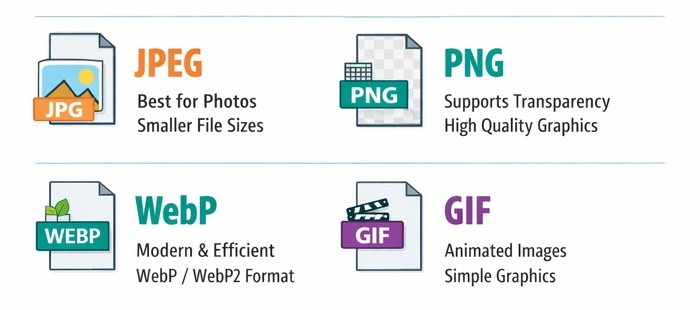
Not all image formats are created equal.
Choosing the right format is an important part of image optimization. Different formats are designed for different purposes, and selecting the wrong one can result in unnecessarily large file sizes or reduced image quality.
For example, a format that works well for photographs may not be the best choice for logos or graphics with transparent backgrounds.
Understanding the strengths and limitations of each format can help you strike the perfect balance between image quality, performance, and compatibility across devices and browsers.
JPEG (JPG) is one of the most common image formats online. It is widely used for websites, blogs, and digital photography because it offers a good balance between image quality and file size.
JPEG uses lossy compression to reduce file sizes, making images faster to load while maintaining good visual quality. It is also supported by virtually all browsers, devices, and image editing programs.
Best for:
- Photographs.
- Blog images.
- Product photos.
Advantages:
- Small file sizes.
- Good quality.
- Universal compatibility.
PNG is often used for graphics and images that require transparency. It is a popular format for logos, icons, illustrations, and other design elements where image quality is important.
PNG uses lossless compression, which preserves all image details but usually results in larger file sizes compared to JPEG. It is widely supported across browsers and devices, making it a reliable choice for web graphics.
Best for:
- Logos.
- Icons.
- Transparent backgrounds.
Advantages:
- High quality.
- Transparency support.
Disadvantages:
- Larger file sizes.
WebP is a modern image format developed by Google. It is designed to provide excellent image quality while significantly reducing file sizes compared to JPEG and PNG.
WebP supports both transparency and compression, making it a versatile choice for websites. Its smaller file sizes can help improve page loading speeds and overall website performance.
Best for:
- Websites.
- Blogs.
- Online stores.
Advantages:
- Smaller file sizes.
- Excellent quality.
- Supports transparency.
Many websites are switching from JPEG and PNG to WebP for better performance.
AVIF is one of the newest image formats available. It offers excellent image quality at even smaller file sizes than WebP, making it an attractive option for modern websites.
AVIF supports transparency, high dynamic range (HDR), and advanced compression techniques, helping websites deliver fast-loading images without sacrificing visual quality.
Advantages:
- Extremely small file sizes.
- Excellent image quality.
As browser support continues to grow, AVIF is becoming increasingly popular.
GIF: GIF is one of the oldest image formats still widely used on the web. It is best known for supporting simple animations, making it a popular choice for short animated graphics, icons, and visual effects.
GIF files support transparency but are limited to a maximum of 256 colors. Because of this limitation, they are generally not suitable for high-quality photographs or detailed images.
Advantages:
- Supports animation.
- Widely supported across browsers and devices.
- Ideal for simple graphics and short animated content.
Although newer formats often provide better compression and image quality, GIF remains a useful option for lightweight animations and visual elements that need universal compatibility.
Image Compression Explained
Compression is one of the most important parts of image optimization.
It reduces file size without significantly affecting image quality.
Smaller image files load faster, use less bandwidth, and improve the overall performance of a website.
In many cases, compression can reduce image sizes dramatically while keeping visual differences almost impossible to notice. There are two main types of compression.
Lossless compression reduces file size while preserving all original image data. This means no visual information is lost, and the image quality remains unchanged.
It is commonly used for logos, icons, screenshots, blog images and graphics where sharp details are important. While file size reductions are usually smaller than with lossy compression, the image retains its original quality.
Benefits:
- No quality loss.
- Perfect image reproduction.
Best for:
- Logos.
- Graphics.
- Professional images.
Lossy compression removes some image data to achieve smaller file sizes. This allows images to load faster and use less storage space. The reduction in quality is often minimal and difficult to notice, especially at moderate compression levels.
Lossy compression is commonly used for photographs, blog images, and other web content where smaller file sizes are a priority.
Benefits:
- Much smaller files.
- Faster loading times.
Best for:
- Blog images.
- Social media graphics.
- Product photos.
Most modern compression tools are so advanced that quality loss is often invisible to the average viewer.
Best Practices for Image Optimization
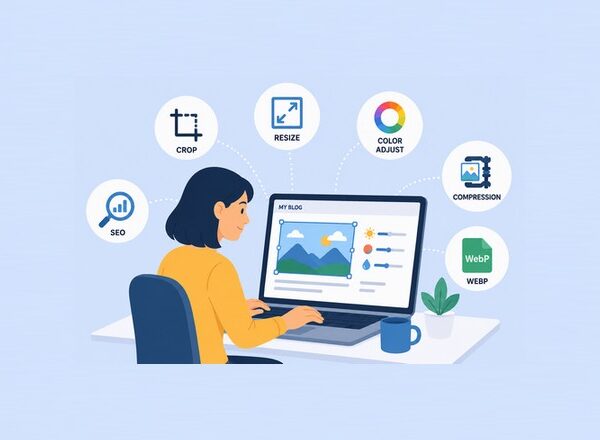
Here are some practical tips that every website owner should follow. These best practices can help improve website performance, reduce loading times, and create a better experience for visitors.
Even small changes to how images are prepared and uploaded can make a noticeable difference in both speed and SEO.
Resize Images Before Uploading
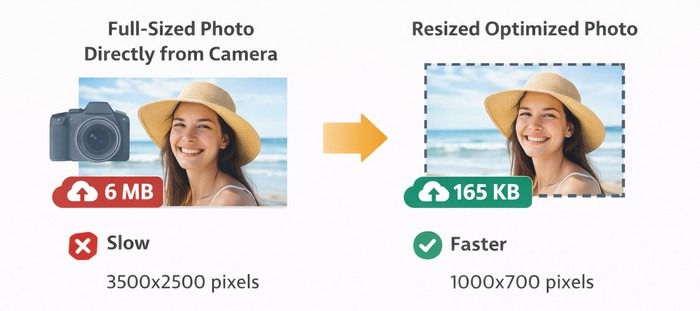
One of the biggest mistakes people make is uploading images directly from cameras or smartphones.
A photo might be 6000 pixels wide, while your website only displays images at 1200 pixels.
Resize images before uploading them.
This alone can dramatically reduce file size.
Use Modern Image Formats
WebP and AVIF can significantly reduce image sizes compared to traditional formats.
Many websites see major performance improvements after switching to modern formats. Smaller file sizes mean faster loading pages, lower bandwidth usage, and a better experience for visitors, especially on mobile devices.
Both formats are becoming increasingly popular as browser support continues to improve and website owners look for ways to optimize performance.
Compress Every Image
Never upload images without compression.
Compression tools can often reduce file sizes by 50–80% without noticeable quality loss. This simple step can significantly improve page loading speeds and reduce the amount of data your website needs to deliver.
Many image optimization tools can even compress images automatically during the upload process, saving both time and effort.
Use Responsive Images
Responsive images allow browsers to load different image sizes based on screen size.
This improves performance on mobile devices. Instead of downloading a large desktop-sized image, smaller devices receive a version that is better suited to their screen resolution.
This helps reduce loading times, save bandwidth, and create a smoother browsing experience for users.
Enable Lazy Loading
Lazy loading delays image loading until users scroll down the page.
This means images that are not immediately visible do not load when the page first opens. As a result, the initial page load is faster and less bandwidth is used.
Lazy loading is especially beneficial for pages with many images, such as blogs, galleries, and online stores.
Benefits include:
- Faster initial page loads.
- Reduced bandwidth usage.
- Better user experience.
Write Descriptive File Names
Instead of:
IMG_12345.jpg
Use:
blue-running-shoes.jpg
Descriptive filenames can help search engines understand image content. They also make it easier to organize and manage images within your website or media library.
Using relevant keywords in filenames can provide additional context and support your overall image SEO efforts.
Add Alt Text
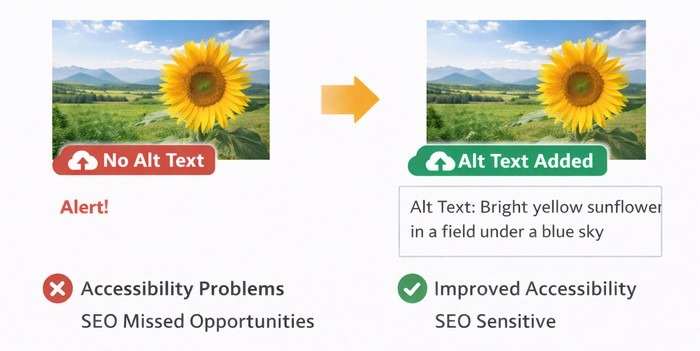
Alt text describes images to search engines and screen readers. It helps search engines understand what an image is about and improves accessibility for users with visual impairments.
Well-written alt text can also support image SEO and provide additional context if an image fails to load properly.
Good alt text improves:
- Accessibility.
- Image SEO.
- User experience.
Example:
“Red mountain bike parked on a forest trail.”
Popular Image Optimization Tools
There are many excellent tools available today. These tools can help automate image compression, format conversion, resizing, and other optimization tasks.
Some are designed for beginners who want a simple one-click solution, while others offer advanced features for developers, designers, and website owners looking for maximum control over image performance.
Some popular options include:
TinyPNG: A simple tool for compressing PNG and JPEG files. It uses smart lossy compression techniques to significantly reduce image size while keeping visual quality almost unchanged.
This tool is widely used by bloggers, designers, and developers because it is fast, easy to use, and works directly in the browser without requiring complex setup.
ShortPixel: Popular among WordPress users for automatic image optimization. It compresses images on upload and can also optimize existing media libraries with bulk processing.
It supports modern formats like WebP and AVIF, helping websites improve loading speed and overall performance with minimal manual effort.
Imagify: Offers compression, WebP conversion, and image optimization. It helps reduce image file sizes while maintaining good visual quality, making websites faster and more efficient.
Furthermore it also integrates easily with WordPress and can automatically optimize images in the background, saving time for website owners.
Squoosh: A free browser-based optimization tool created by Google. It allows you to compress and compare images in real time, giving you full control over quality and file size.
Squoosh supports multiple modern formats like WebP and AVIF, making it a great option for quick, high-quality image optimization directly in your browser.
Optimole: Combines image optimization with CDN delivery. It automatically compresses, resizes, and serves images through a global content delivery network to ensure fast loading times for visitors around the world.
It also adapts images in real time based on the user’s device and screen size, helping improve both performance and user experience.
Image Optimization and Core Web Vitals
Google introduced Core Web Vitals to measure user experience.
Images have a direct impact on these metrics.
Optimized images can improve loading speed, visual stability, and interactivity across a website.
By reducing file sizes and serving properly formatted images, you can significantly enhance performance scores and create a smoother experience for users. Optimized images can improve:
Largest Contentful Paint (LCP)
Largest Contentful Paint (LCP) measures how long it takes for the largest visible element on a webpage to fully load and appear on the screen. In most cases, this element is an image, video, or large block of text.
A fast LCP score means users can see the main content of a page quickly, which improves perceived performance and reduces the chance of visitors leaving early. Optimizing and compressing images is one of the most effective ways to improve LCP.
- Measures loading performance.
- Smaller images often improve LCP scores.
Cumulative Layout Shift (CLS)
Cumulative Layout Shift (CLS) measures how much the visible content on a webpage unexpectedly shifts while the page is loading. This often happens when images load without defined sizes, causing elements like text or buttons to jump around.
A low CLS score means the page feels stable and smooth as it loads. Proper image sizing and optimization help prevent these layout shifts and improve overall user experience.
- Measures visual stability.
- Properly sized images help prevent layout shifts.
Interaction to Next Paint (INP)
Interaction to Next Paint (INP) measures how quickly a website responds to user interactions, such as clicks, taps, or keyboard inputs. It reflects the overall responsiveness of a page after it has loaded.
A good INP score means the site reacts smoothly and without noticeable delays, creating a better user experience. Optimized images help reduce page weight and processing time, which can indirectly improve INP by making the page faster and more efficient.
- Fast-loading pages improve overall responsiveness.
- Optimized images contribute to better scores across all three metrics.
Common Image Optimization Mistakes
Avoid these common mistakes: Many website performance issues come from simple errors that are easy to fix but often overlooked.
By avoiding these mistakes, you can significantly improve loading speed, user experience, and overall website efficiency.
Taking a few extra seconds to prepare images properly can save a lot of performance problems later.
- Uploading oversized images.
- Using PNG for every image.
- Ignoring compression.
- Missing alt text.
- Not using WebP.
- Skipping lazy loading.
- Using poor filenames.
- Uploading original camera files.
Fixing these issues can deliver immediate performance improvements.
The Future of Image Optimization
Image technology continues to evolve rapidly.
New formats like AVIF are pushing file sizes even lower while maintaining exceptional quality. These advancements allow websites to deliver faster loading images without sacrificing visual clarity, even on high-resolution screens.
As browser support improves, modern formats are becoming a standard part of web optimization strategies.
Artificial Intelligence is also transforming image optimization. AI-powered tools can now automatically compress, resize, enhance, and even upscale images with minimal effort, making the entire workflow faster and more efficient than ever before.
Modern AI tools can:
- Automatically resize images.
- Enhance quality.
- Upscale low-resolution photos.
- Remove backgrounds.
- Compress files intelligently.
As websites become more visual, image optimization will become even more important.
Final Thoughts
Image optimization may not be the most exciting part of website management, but it is one of the most valuable.
A few simple changes can dramatically improve loading speeds, SEO performance, user experience, and mobile usability.
Every image uploaded to your website should be resized, compressed, and optimized for the web. The benefits are immediate and long-lasting.
At Pixwizify, we believe that great visuals and excellent performance should go hand in hand. By understanding image optimization and applying the best practices covered in this guide, you can create faster websites, happier visitors, and stronger search engine rankings.
The next time you upload an image, take a moment to optimize it first. Your visitors—and your website—will thank you.
Disclosure: We sometimes use affiliate links in our content. Some of the links in this post are “affiliate links.” This means if you click on the link and purchase the item, we will receive an affiliate commission. It helps our website keep running and allows us to offset our writing team’s costs. Thanks for your support.