Images make every website more attractive, engaging, and easier to understand. They help explain ideas, break up long sections of text, and keep visitors interested. But there is one small detail that many website owners forget: image alt text.
Alt text (alternative text) is much more than a simple description of an image. It helps search engines understand what an image contains, improves accessibility for people using screen readers, and can even increase traffic from image search results.
Many bloggers and website owners upload beautiful images, add a filename, and click Publish without writing meaningful alt text. That means they miss an easy opportunity to improve their SEO and create a better experience for visitors.
The good news is that writing effective alt text isn’t difficult. Once you understand a few simple principles, you can optimize images on your website in just a few seconds.
In our guide, you will learn what image alt text is, why it matters, how search engines use it, common mistakes to avoid, practical writing tips, and several helpful tools that make the process easier.
What Is Image Alt Text?
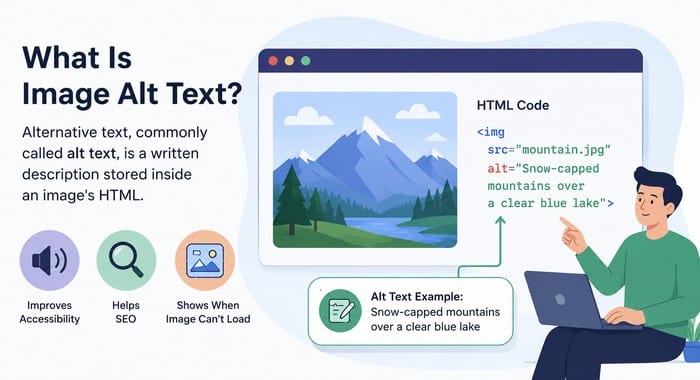
Alternative text, commonly called alt text, is a written description stored inside an image’s HTML.
It explains the content or purpose of an image for people using screen readers and helps search engines better understand what the image represents.
When an image cannot be displayed because of a slow connection, browser issue, or other technical problem, the alt text may also appear in its place. This makes alt text an important part of both web accessibility and image SEO.
For example:
<img src="golden-retriever.jpg" alt="Golden Retriever puppy playing in green grass">Visitors normally don’t see the alt text on the page. Instead, it serves three important purposes:
- It describes images to screen readers.
- It appears if an image cannot load.
- It helps search engines understand image content.
Think of alt text as giving your images a voice.
Why Alt Text Matters for SEO
Search engines have become much better at recognizing images through artificial intelligence, but they still rely heavily on written information.
Good alt text provides additional context that helps search engines connect images with the surrounding content.
Well-written image alt text can help:
- Improve image rankings in Google Images.
- Strengthen topical relevance.
- Reinforce important keywords naturally.
- Increase organic traffic.
- Improve page quality signals.
Google has explained that alt text should primarily describe the image for users while also helping search engines understand its content. Good descriptions naturally support SEO without sounding forced.
Accessibility Comes First
One of the biggest reasons alt text exists has nothing to do with SEO.
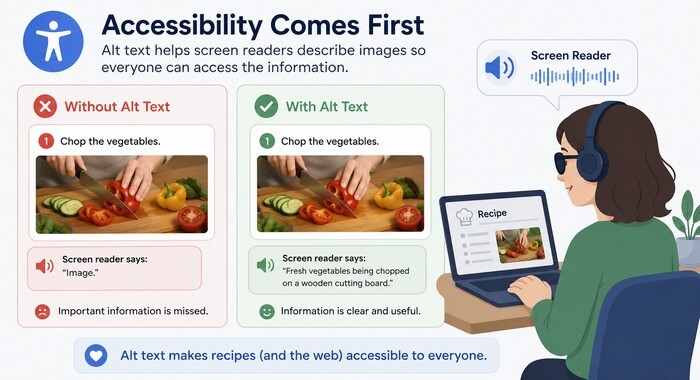
Millions of people use screen readers because of visual impairments. These assistive technologies read the alt text aloud so users understand what appears in an image.
Imagine reading a recipe that includes photos of each cooking step. Without alt text, someone using a screen reader would miss valuable information.
Instead of hearing:
“Image.”
They would hear:
“Fresh vegetables chopped on a wooden cutting board before cooking.”
That creates a much better experience.
The Web Content Accessibility Guidelines (WCAG) recommend providing text alternatives for meaningful images, making websites more accessible to everyone.
How Google Uses Alt Text
Google looks at many different signals when understanding images.
Alt text is one of them.
Well-written alt text gives Google additional context about an image, making it easier to understand how it relates to the surrounding content and improving its chances of appearing in relevant image search results.
Google also considers:
- Surrounding text.
- Image filenames.
- Captions.
- Page title.
- Headings.
- Structured data.
- Overall page content.
This means your image alt text should work together with the rest of the page instead of standing alone.
For example, if your article discusses image optimization, an image showing compression software should have alt text that matches that topic naturally.
What Makes Good Alt Text?
Good alt text answers a simple question:
What is shown in this image?
Imagine describing the image to someone over the phone.
Your description should help that person clearly understand the image, including the most important details, without making it longer or more complicated than necessary.
A good description is:
- Specific
- Clear
- Natural
- Brief
- Relevant
For example:
Poor image alt text:
ImageBetter:
Laptop displaying website analytics dashboardEven better:
Google Analytics dashboard showing website traffic growthNotice how the final example provides useful context without becoming too long.
Keep It Natural
One of the biggest SEO mistakes is forcing keywords into alt text.
Instead of trying to fit as many keywords as possible into a description, focus on accurately describing the image in clear, natural language.
Search engines and users benefit far more from helpful descriptions than from keyword-stuffed text.
For example:
SEO image optimization SEO images image optimization SEO guide best SEO imagesThat is not helpful for anyone.
Instead, write naturally.
Person optimizing website images inside WordPress media libraryIf your keyword fits naturally, include it once.
If it does not fit, leave it out.
Google values useful descriptions much more than keyword stuffing.
Match the Image to the Page Content
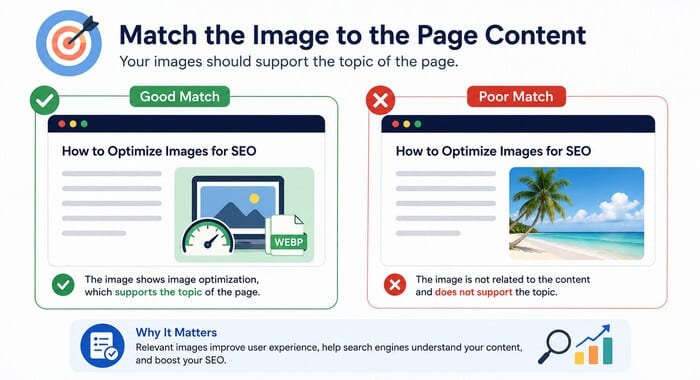
Your images should support the topic of the page. The image alt text should also support that topic.
Imagine your article is about compressing images. An image showing compression software could use:
Image compression software reducing photo file sizesThat fits the surrounding content perfectly.
Describe Important Details
You do not need to describe every tiny detail in an image. The goal of alt text is to provide the most useful information, not to create a complete visual report.
Focus on the details that matter most, such as the main subject, important actions, relevant objects, or information that supports the surrounding content.
A concise and meaningful description creates a better experience for both users and search engines.
Instead of:
Woman sitting outside.Write:
Digital marketer working on laptop at outdoor café.The second version provides useful context.
Decorative Images Don’t Always Need Alt Text
Some images exist purely for design.
Since these images don’t add meaningful information, they usually don’t need descriptive alt text.
Using an empty alt attribute allows screen readers to skip decorative elements and focus on content that matters to the user.
Examples include:
- Background graphics
- Decorative borders
- Abstract shapes
- Visual dividers
These usually should have empty alt text:
alt=""This tells screen readers to skip decorative images instead of reading unnecessary information.
Avoid Starting With “Image Of”
Screen readers already announce that an element is an image.
Starting alt text with phrases like “image of” or “picture of” adds unnecessary repetition and uses valuable space that could be better spent describing the actual content.
Instead, begin with the most important details and focus on what the image shows, its purpose, or the information it provides.
Instead of writing:
Image of mountain landscapeSimply write:
Snow-covered mountain landscape during sunriseIt sounds cleaner and provides more useful information.
Include Keywords Naturally
Many SEO beginners think every image needs a keyword included in the alt text. That is not true. Alt text should primarily describe the image accurately, not act as a place to insert as many SEO keywords as possible.
Only include keywords when they genuinely describe the image and fit naturally within the description. Forced keyword usage can make alt text less useful for visitors and may create a poor accessibility experience.
For example, in an article about image optimization:
Designer compressing large website images before uploadThe keyword appears naturally because it fits the image.
How Long Should Alt Text Be?
There is no strict character limit for image alt text. The most important factor is creating a clear and useful description that accurately explains the image.
Most SEO professionals recommend keeping alt text reasonably short and focused.
A good guideline is around 50–125 characters, although slightly longer descriptions are perfectly acceptable when additional details are needed to provide meaningful context.
Avoid writing long paragraphs or adding unnecessary information. The goal is to describe the image in a way that helps users understand its purpose quickly.
Ask yourself:
Could someone understand the image after reading this description?
If yes, you have likely written enough.
Common Image Alt Text Mistakes
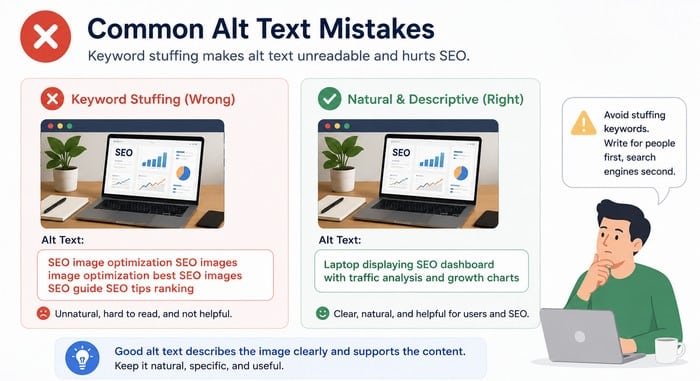
Many websites repeat the same alt text errors, often without realizing that poor image descriptions can affect accessibility, user experience, and SEO performance.
One common mistake is leaving alt text completely empty for important images. Another is copying the page title or article headline into every image, even when it does not accurately describe the visual content.
Some websites also fill image alt text with keywords, creating descriptions that sound unnatural and provide little value to visitors using screen readers.
Others write descriptions that are too vague, making it difficult for users and search engines to understand what the image actually shows.
Effective alt text should be accurate, descriptive, and focused on helping people understand the image.
Take this example:
Poor:
PictureBetter:
Small business owner editing product photosSimple improvements like this can make a significant difference.
Image Alt Text Examples
Let us compare several examples to understand how small changes can make alt text more descriptive, useful, and SEO-friendly.
Good alt text should clearly explain what appears in an image while providing meaningful context for both search engines and users who rely on screen readers.
By comparing poor and improved examples, you can see how to create descriptions that are specific without becoming too long or filled with unnecessary keywords.
| Image | Weak Alt Text | Better Alt Text |
| Dog | Dog | Golden Retriever puppy running through autumn leaves. |
| Laptop | Computer | Laptop displaying WordPress dashboard. |
| Coffee | Coffee | Fresh cup of coffee beside notebook and camera. |
| Mountain | Nature | Hiking trail leading toward snow-covered mountains. |
| Marketing | Office | The marketing team is reviewing SEO reports during the meeting. |
Notice how each improved example adds meaningful context.
Optimize Image Filenames Too
Alt text works even better when paired with descriptive filenames.
Before uploading images to your website, choose filenames that clearly explain what the image represents and avoid using random numbers, default camera names, or unclear descriptions.
Instead of:
IMG_8493.jpgUse:
website-image-optimization-guide.jpgSearch engines use filenames as another clue about image content, helping them better understand the topic and context of your images.
A clear filename also makes your media library easier to organize and manage over time.
Add Captions When Helpful
Captions are different from image alt text and serve a separate purpose. Visitors can see captions displayed below images, while alt text stays hidden unless it is needed by screen readers or cannot be displayed.
Captions often increase user engagement because people naturally read text placed below images. while scanning content. They can provide additional details, explain the image’s relevance, or add helpful context that supports the surrounding article.
Together, captions and image alt text create a stronger context by improving accessibility, user experience, and search engine understanding of your images.
Use High-Quality Images
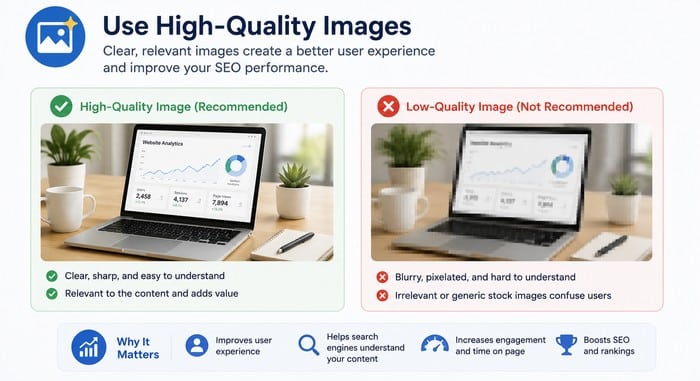
SEO is not only about text. Images play an important role in creating a better user experience and helping search engines understand your content.
Try to use:
- Original graphics that provide unique value.
- High-resolution photos that look professional and clear.
- Proper compression to reduce file sizes without sacrificing quality.
- Modern image formats like WebP or AVIF for better performance.
Well-optimized images help pages load faster, improve engagement, and create a smoother browsing experience.
Faster-loading pages improve both user satisfaction and SEO performance, making image optimization an important part of a complete SEO strategy.
Helpful Tools for Writing and Optimizing Alt Text
Several excellent tools can help you create better alt text or identify images missing descriptions. These tools can save time, improve accessibility, and make it easier to maintain proper image optimization across your website.
From WordPress plugins that highlight missing alt attributes to AI-powered tools that generate image descriptions, there are many options available for improving your workflow.
However, always review and edit generated suggestions to ensure they accurately describe the image and match the purpose of your content.
Ahrefs Webmaster Tools
Ahrefs Site Audit can identify images with missing alt attributes and other SEO issues across your website.
It helps website owners discover technical problems that may affect search visibility and provides recommendations for improving overall SEO health.
By regularly checking image-related issues, you can ensure that important images include descriptive image alt text and follow best practices for accessibility and search engine optimization.
Screaming Frog SEO Spider
A favorite among SEO professionals, Screaming Frog scans your website and reports important image optimization issues, including:
- Missing alt text.
- Duplicate alt text.
- Large image files.
- Broken images.
The tool helps you quickly identify technical SEO problems that may affect accessibility, user experience, and search engine visibility.
By regularly auditing your website, you can make sure your images are properly optimized and provide useful information for both visitors and search engines.
Semrush Site Audit
Semrush Site Audit automatically detects accessibility and SEO problems, including missing or duplicated image alt attributes. It helps website owners find image-related issues that may affect search visibility and user experience.
By regularly running audits, you can identify pages that need improvement, update missing descriptions, and ensure your images follow SEO and accessibility best practices. This makes it easier to maintain a well-optimized website as your content grows.
Yoast SEO
Yoast SEO helps WordPress users follow SEO best practices while optimizing pages, posts, and images.
Although it does not generate image alt text automatically, it encourages proper on-page optimization and makes it easier to manage image-related SEO as part of your overall content strategy.
When combined with descriptive image filenames, optimized image sizes, and well-written alt text, Yoast SEO can help improve your site’s search visibility, accessibility, and overall user experience.
Rank Math SEO
Rank Math provides image SEO features and helps WordPress users improve on-page optimization.
It includes options for managing image attributes, optimizing metadata, and identifying SEO opportunities that can enhance your site’s overall search performance.
When combined with descriptive image alt text, optimized image filenames, and proper image compression, Rank Math helps ensure your images contribute to both accessibility and better rankings.
Its user-friendly interface also makes it easy to maintain image SEO best practices as you publish new content.
Google Lighthouse
Google Lighthouse evaluates accessibility and identifies missing image descriptions as part of its accessibility audit.
It also analyzes performance, SEO, and other best practices, making it a valuable tool for improving the overall quality of your website.
By reviewing Lighthouse reports, you can quickly find images that need descriptive alt text and address accessibility issues that may impact both users and search engine visibility.
Regular audits help ensure your site follows modern web standards while delivering a better experience for all visitors.
WAVE Accessibility Evaluation Tool
WebAIM’s WAVE Accessibility Evaluation Tool quickly highlights accessibility issues, including images missing alternative text.
It provides a visual overview of potential problems directly on your web pages, making it easy to identify and fix accessibility errors.
WAVE is especially useful for checking that images have meaningful alt text and that your content is accessible to people using screen readers.
Regular accessibility audits can improve the user experience while helping your website meet modern web accessibility standards.
AI Can Help Write Better Image Alt Text
Artificial intelligence is making image optimization much faster by automatically analyzing images and suggesting descriptive alt text.
Several AI-powered tools can generate image descriptions based on visual recognition, helping website owners save time when optimizing large image libraries.
While AI-generated descriptions provide an excellent starting point, they should always be reviewed and refined by a human.
Adding context, correcting inaccuracies, and matching the description to the purpose of the page will produce more accurate, accessible, and SEO-friendly alt text.
AI-generated descriptions can save time, especially on websites with hundreds of images.
Still, it’s a good idea to review each suggestion before publishing. Human editing ensures the description matches your content and sounds natural.
Image SEO Goes Beyond Alt Text
Alt text is only one piece of image optimization.
While descriptive alt text helps search engines understand your images and improves accessibility, a complete image SEO strategy requires attention to several other important factors.
For the best results, also focus on:
- Compressing images before upload.
- Choosing descriptive filenames.
- Using responsive images.
- Serving modern formats like WebP.
- Creating image sitemaps.
- Adding structured data when appropriate.
- Writing helpful surrounding content.
Together, these improvements create a stronger SEO strategy.
Frequently Asked Questions
Does image alt text improve SEO?
Yes. Alt text helps search engines understand image content, supports accessibility, and can improve visibility in image search results. While it is only one ranking factor, it contributes to a stronger overall on-page SEO.
Should every image have alt text?
Meaningful images should have descriptive alt text. Decorative images that add no informational value should use an empty alt attribute (alt="") so screen readers can ignore them.
Can I include keywords in an image alt text?
Yes, but only when the keyword naturally describes the image. Avoid keyword stuffing or repeating the same phrase across multiple images.
What is the ideal length for alt text?
Aim for a concise description, typically around 50–125 characters. The most important goal is to clearly describe the image in natural language.
Can AI generate image alt text?
Yes. AI tools such as ChatGPT, Google Gemini, Microsoft Copilot, and Adobe Express AI can generate image descriptions. It’s still a good practice to review and refine AI-generated text before publishing.
Conclusion
Image alt text may seem like a small detail, but it plays an important role in both accessibility and SEO. A few carefully chosen words can help search engines understand your images, improve the experience for visitors using assistive technology, and increase your chances of appearing in image search results.
The best image alt text is clear, concise, and genuinely describes what appears in the image. It supports the surrounding content instead of repeating keywords, and it provides useful context without sounding artificial.
As you publish new blog posts or update older content, make your image alt text part of your regular optimization routine. Combined with fast-loading images, descriptive filenames, and high-quality visuals, it can strengthen your overall SEO strategy and create a better experience for every visitor.
From beginners learning the fundamentals of image optimization to experienced creators exploring advanced AI tools, PixWizify provides the guidance and resources you need to create better images.