Images are one of the most important parts of modern websites. They make content more engaging, explain ideas faster, and help create better user experiences.
However, large image files can also slow down pages, increase bandwidth usage, and negatively affect website performance.
For years, JPEG and PNG were the standard image formats used across the web. Today, newer formats such as WebP and AVIF are changing how websites handle images.
Both formats offer better compression, smaller file sizes, and improved performance compared to older formats.
This leads to an important question: AVIF vs WebP — which image format should you use for your website?
The answer depends on several factors, including image quality, browser support, website speed goals, workflow, and how easily you want to manage your images.
In our guide, we will compare AVIF vs WebP in detail. We will explore their differences, advantages, disadvantages, SEO impact, compatibility, and practical usage so you can choose the right format for your website.
What Is WebP?

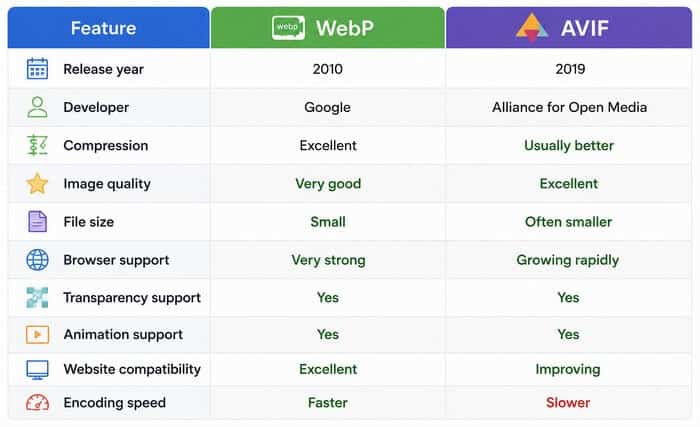
WebP is a modern image format created by Google and introduced in 2010. It was designed to provide better compression than traditional formats such as JPEG and PNG while maintaining good image quality.
WebP supports both lossy and lossless compression. Lossy compression reduces file size by removing some image data, while lossless compression keeps all original image information.
The main goal behind WebP was simple: create smaller images that load faster without noticeable quality loss.
Today, WebP is widely supported by modern browsers and has become one of the most popular alternatives to older image formats.
According to Google, WebP images can often be significantly smaller than comparable JPEG or PNG files while maintaining similar visual quality.
What Is AVIF?

AVIF stands for AV1 Image File Format. It is a newer image format based on the AV1 video codec developed by the Alliance for Open Media.
AVIF was created to deliver extremely efficient image compression. It can achieve smaller file sizes than many other formats while preserving excellent image quality.
Like WebP, AVIF supports both lossy and lossless compression. It also supports advanced features such as:
- High Dynamic Range (HDR) images.
- Wide color spaces.
- Transparency.
- Animation.
Because AVIF uses newer compression technology, it can often produce smaller files than WebP, especially for complex photographs and detailed images.
However, AVIF is newer than WebP, which means adoption and support are still developing.
AVIF vs WebP: Image Quality Comparison
Both formats are excellent choices, but they are designed for slightly different priorities.
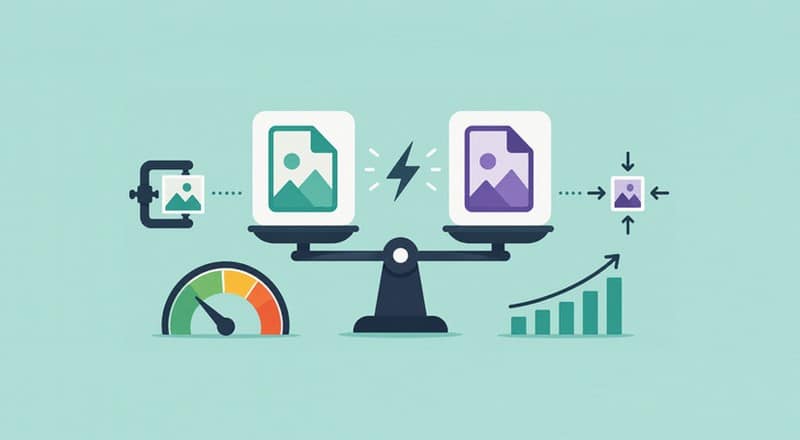
WebP focuses on broad compatibility and practical website usage. AVIF focuses on maximum compression efficiency and future-facing performance.
Image quality is one of the biggest factors when choosing an image format.
WebP delivers impressive results for most websites. A properly optimized WebP image can look almost identical to the original image while reducing file size significantly.
For blogs, online stores, portfolios, and business websites, WebP usually provides more than enough quality.
AVIF takes image compression further. It can preserve more detail at smaller file sizes, especially with photographs containing many colors, textures, and gradients.
For example, a large photography website with thousands of high-resolution images may benefit greatly from AVIF because reducing every image file by even a small amount can create major performance improvements.
However, image quality differences are not always noticeable to visitors. A well-optimized WebP image may already provide an excellent experience.
The best format depends on your priorities:
- Choose WebP for reliable quality and easier implementation.
- Choose AVIF when maximum compression efficiency matters.
AVIF vs WebP: File Size and Compression
Website speed is closely connected to image file size.
Large images require more time to download, especially for mobile users with slower connections. Smaller image files help pages load faster and improve user experience.
AVIF generally provides stronger compression than WebP. In many tests, AVIF images are smaller while maintaining similar visual quality.
This advantage becomes important for websites with:
- Large photo libraries.
- Image-heavy landing pages.
- Online stores.
- News websites.
- Photography portfolios.
WebP still performs very well and offers a great balance between compression and compatibility.
For many websites, the difference between WebP and AVIF may only be a few kilobytes per image. For websites with thousands of images, those savings can become much more meaningful.
Advantages of WebP
Excellent Browser Support
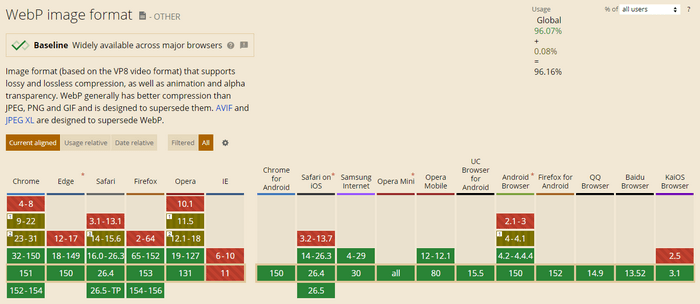
WebP provides better compression than JPEG, PNG, and GIF, making it a strong modern replacement for those formats.
One of WebP’s biggest advantages is compatibility.
Most modern browsers support WebP, including:
- Google Chrome
- Microsoft Edge
- Firefox
- Safari
- Opera
This makes WebP easier to implement because fewer visitors will encounter compatibility issues.
Source: Caniuse.
Easier Website Implementation
WebP has been available for many years, so website platforms, plugins, and optimization tools have mature support.
WordPress users can easily convert images to WebP using many popular image optimization plugins.
Many CDN providers also support automatic WebP conversion and delivery.
This means website owners can start using WebP without changing their entire workflow.
Good Balance Between Quality and Performance
WebP provides a strong balance between smaller file sizes and visual quality.
For most websites, it offers enough compression improvement to make a noticeable difference in page speed.
It is especially useful for: Blog images, featured images, product photos, and website graphics.
Disadvantages of WebP
Compression Is Not Always as Efficient as AVIF
WebP is powerful, but AVIF generally achieves better compression.
When comparing images at similar quality levels, AVIF often creates smaller files.
This means websites focused on achieving the absolute fastest loading speeds may prefer AVIF.
Older Tools May Lack Support
Although WebP support is now widespread, some older image editing tools and systems may not fully support WebP workflows.
However, this is becoming less common as adoption continues.
Advantages of AVIF
Smaller Image Files
The biggest advantage of AVIF is compression efficiency.
AVIF can reduce image file sizes significantly while keeping excellent quality.
Smaller files mean:
- Faster page loading.
- Lower bandwidth usage.
- Better mobile performance.
- Improved user experience.
This makes AVIF especially attractive for websites where performance is a major priority.
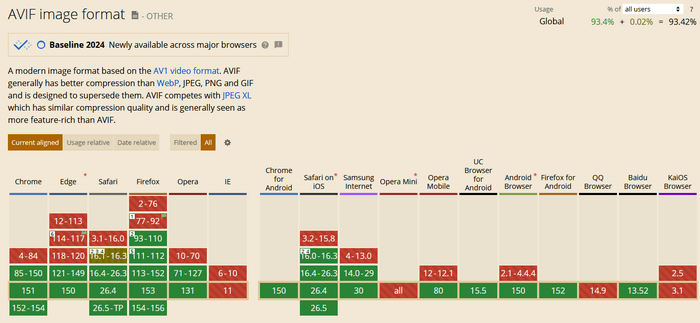
More information on Caniuse.
Excellent Image Quality
AVIF performs extremely well with detailed images.
Photographs, artwork, and complex visuals often benefit from AVIF’s advanced compression technology.
It can maintain impressive detail even at lower file sizes.
Future-Focused Format
AVIF is gaining popularity across the web.
Major browsers and platforms continue improving support, making AVIF a strong choice for the future of website optimization.
Disadvantages of AVIF
Slower Encoding Speed
One limitation of AVIF is that creating AVIF files can take longer compared to WebP.
For websites processing thousands of images, encoding speed may become a consideration.
Many optimization services solve this problem by handling conversion automatically.
Compatibility Is Still Developing
AVIF browser support has improved significantly, but WebP still has broader adoption.
Some older browsers and systems may not support AVIF.
For this reason, many websites use AVIF with a fallback image format such as WebP.
Is AVIF or WebP Easier to Use on a Website?
For most website owners, WebP is currently easier to use.
It has been around longer, has wider support, and works smoothly with most website optimization tools.
If you use WordPress, many image optimization plugins can automatically convert your images to WebP and serve them to visitors.
AVIF is also becoming easier to use. Modern CDN services and optimization platforms can automatically generate AVIF versions and deliver them to supported browsers.
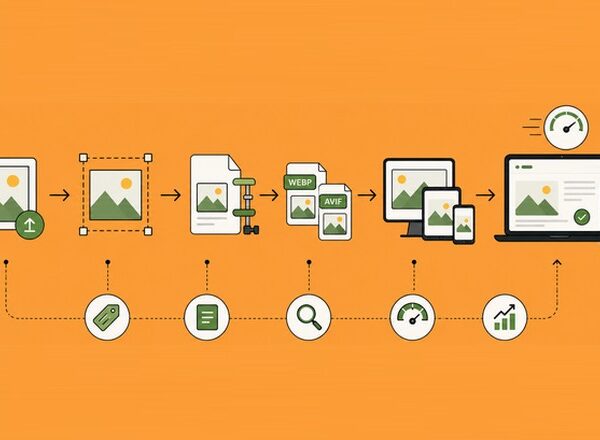
A common modern approach is:
- Upload your original image.
- Generate AVIF and WebP versions.
- Automatically serve the best format supported by each visitor’s browser.
This approach gives you the performance benefits of AVIF while maintaining compatibility.
AVIF vs WebP for SEO: Which Format Helps Your Website Rank Better?
Image optimization is an important part of technical SEO. Search engines want to provide users with fast, useful, and accessible websites. Large, unoptimized images can slow down page loading times, especially on mobile devices.
However, choosing between AVIF vs WebP is not as simple as selecting the format with the smallest file size. A good image strategy needs to consider performance, compatibility, image quality, user experience, and workflow.
Google does not rank websites higher simply because they use AVIF or WebP. Instead, these formats can indirectly improve SEO by helping websites load faster and provide a better experience for visitors.
Source: Google Page Experience.
Does AVIF Improve SEO More Than WebP?
AVIF does not receive a direct SEO ranking advantage over WebP.
Search engines do not say, “This website uses AVIF, so it deserves a higher ranking.” Instead, search engines evaluate signals such as:
- Page loading speed.
- Core Web Vitals performance.
- Mobile usability.
- User experience.
- Content quality.
Because AVIF can create smaller image files, it may help improve these areas when implemented correctly.
For example, replacing a large JPEG image with an optimized AVIF version can reduce page weight. A lighter page may load faster, which creates a better experience for visitors.
The same is true for WebP.
A well-optimized WebP image can improve page speed and enhance technical SEO performance.
The important point is this:
The format itself does not improve rankings. Performance improvements from image optimization can lead to better SEO results.
AVIF vs WebP: Which Format Is Better for Core Web Vitals?
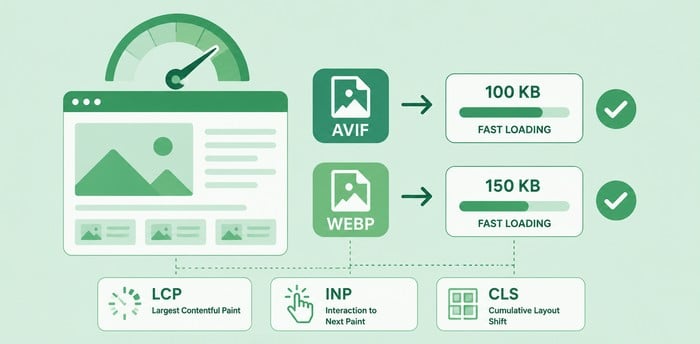
Core Web Vitals measure important aspects of user experience, including loading speed, interaction, and visual stability.
Images often have a major impact on these metrics.
Large images can affect:
- Largest Contentful Paint (LCP)
- Mobile loading performance
- Overall page speed
Both AVIF and WebP can help reduce these problems.
AVIF usually has an advantage because it can achieve smaller file sizes. A hero image that is reduced from 300 KB to 100 KB can load much faster.
However, implementation quality matters more than the format alone.
A poorly optimized AVIF image can still slow down a website. A properly optimized WebP image can outperform an incorrectly configured AVIF workflow.
Source: Google Core Web Vitals.
Should You Convert All Images to AVIF?
Not necessarily.
AVIF is an excellent format, but converting every image immediately may not be the best approach for every website.
Before switching completely to AVIF, consider:
- Your audience’s browser usage
- Your website platform
- Your current optimization tools
- Your image workflow
Many professional websites now use a combination approach:
Original image → AVIF + WebP versions → Browser receives the best option
This method provides maximum performance without sacrificing compatibility.
For example:
- Chrome visitors may receive AVIF.
- Visitors using browsers without AVIF support may receive WebP.
- Older browsers may receive JPEG or PNG.
This automated delivery system allows websites to use modern formats without worrying that every visitor has the same browser capabilities.
Using AVIF and WebP in WordPress
WordPress has made image optimization much easier over recent years.
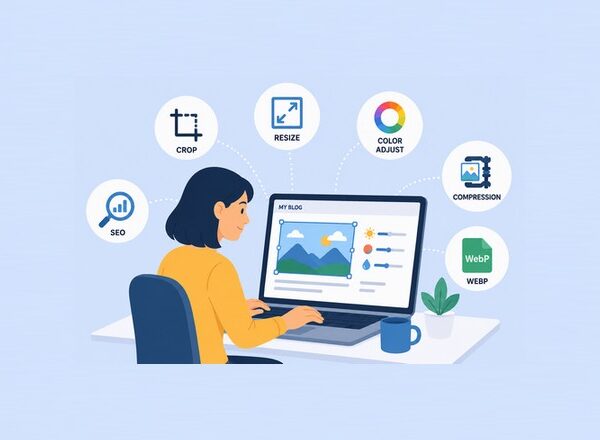
Modern image optimization plugins can automatically:
- Compress uploaded images.
- Convert JPEG and PNG files.
- Generate WebP versions.
- Generate AVIF versions.
- Deliver optimized images to visitors.
Popular WordPress image optimization solutions include:
These tools can handle much of the technical work automatically.
For many WordPress users, the easiest solution is not manually converting images. Instead, use an optimization plugin or CDN that automatically serves the best format.
Best Practices for Using AVIF and WebP
Choosing a modern image format is only one part of image optimization. Follow these practices to get the best results.
Compress Images Before Uploading
Even modern formats should be optimized.
Uploading extremely large original images and relying completely on automatic conversion can waste storage and processing resources.
Resize and compress images to the correct dimensions before uploading.
For example:
A blog featured image does not need to be a 6000-pixel camera photo. A properly sized image will load faster and maintain quality.
Use Responsive Images
Different devices need different image sizes.
A smartphone does not need the same large image delivered to a desktop monitor.
Responsive images allow browsers to download the most appropriate version.
WordPress automatically supports responsive image attributes, making this easier for website owners.
Add Proper Image Alt Text
Image optimization is not only about speed.
Search engines also need context to understand images.
Good alt text helps accessibility and provides additional information about image content.
For example:
Poor alt text:
image123.jpgBetter alt text:
Website performance comparison showing AVIF and WebP image formatsAlt text should describe the image naturally without forcing keywords.
Use Lazy Loading
Lazy loading delays image loading until images are needed.
This prevents browsers from downloading every image immediately when a visitor opens a page.
For pages with many images, lazy loading can significantly improve initial loading speed.
AVIF vs WebP: Which One Should You Choose?
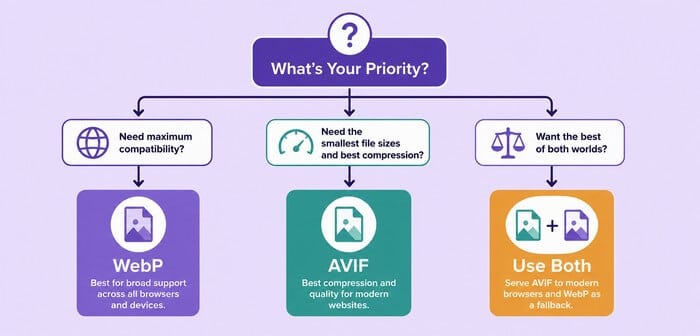
The best choice depends on your website goals.
Choose WebP If:
WebP is a great option if you want:
- Excellent browser compatibility.
- Easy implementation.
- Reliable performance.
- Simple website management.
It is still one of the best image formats available for websites.
For many blogs, business websites, and small online stores, WebP provides the perfect balance.
Choose AVIF If:
AVIF is a better choice if you want:
- Maximum compression.
- Smaller image files.
- Advanced image quality.
- Future-focused optimization.
It is especially useful for:
- Image-heavy websites.
- Photography websites.
- Large content platforms.
- Websites focused on maximum performance.
Our Recommendation: AVIF vs WebP
For most websites in 2026, the best approach is not to choose only one format.
A modern image optimization strategy should use both.
Serve AVIF when possible because it offers excellent compression and performance benefits.
Keep WebP as a reliable fallback because it provides strong quality and broader compatibility.
This combination gives your website the best balance between speed, quality, and accessibility.
Frequently Asked Questions About AVIF vs WebP
Is AVIF better than WebP?
AVIF generally provides better compression and can create smaller image files. However, WebP offers wider compatibility and easier implementation. The better choice depends on your website’s needs.
Does Google prefer AVIF over WebP?
Google does not officially prefer one format over the other. Both AVIF and WebP can improve website performance when properly optimized.
Can I use AVIF and WebP together?
Yes. Many websites use both formats. They generate multiple versions and automatically deliver the best supported format to each visitor.
Does WebP reduce image quality?
No. WebP can maintain excellent image quality while reducing file size. With proper compression settings, quality differences are often difficult to notice.
Is AVIF supported by WordPress?
Yes, newer WordPress versions and many optimization plugins support AVIF. However, availability depends on your hosting environment, image tools, and plugin configuration.
Conclusion
The discussion around AVIF vs WebP is not about finding a single winner. Both formats represent a major improvement over older image formats like JPEG and PNG.
WebP remains a reliable choice because it is fast, widely supported, and easy to implement.
AVIF pushes image compression further and offers impressive performance benefits for websites looking to reduce file sizes as much as possible.
For most website owners, the smartest strategy is using both formats together. Let your optimization tools create AVIF and WebP versions, and then let browsers choose the best option automatically.
Modern image optimization is about creating the best experience for visitors. Faster pages, better visuals, and efficient delivery all contribute to a stronger website.
By understanding the differences between AVIF and WebP, you can make a smarter decision and build a website that is ready for the future of image performance.
No matter where you are on your image optimization journey, PixWizify is here to help.
From comparing modern image formats like AVIF and WebP to mastering advanced optimization techniques, you can find practical advice, in-depth guides, and helpful tools to create high-quality images that load faster and support better SEO.
Disclosure: We sometimes use affiliate links in our content. Some of the links in this post are “affiliate links.” This means if you click on the link and purchase the item, we will receive an affiliate commission. It helps our website keep running and allows us to offset our writing team’s costs. Thanks for your support.