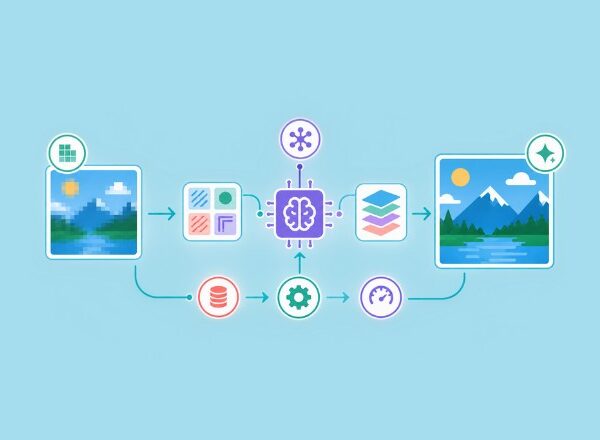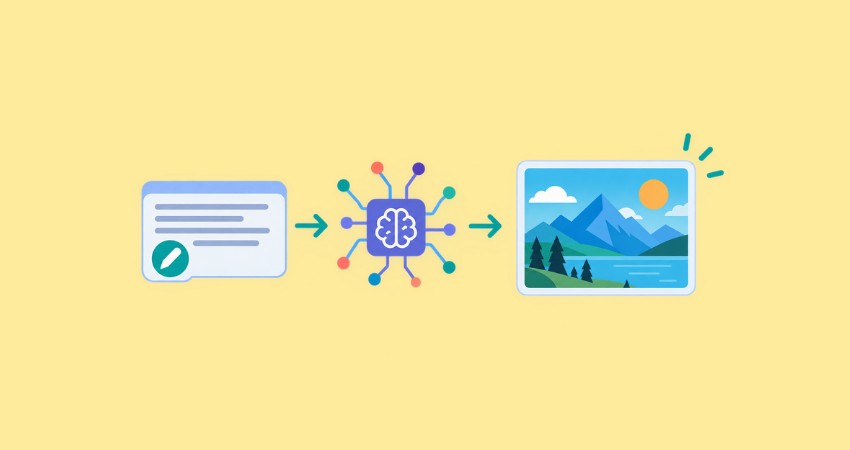
Artificial intelligence is changing the way we create images. Today, you can turn a simple written description into a digital illustration, a realistic-looking photograph, or a creative concept image in just a few steps.
You no longer need advanced drawing skills or years of design software experience to bring an idea to life.
This is where AI image generation comes in.
AI image generators let you explore visual ideas, experiment with different styles, and create images for websites, blogs, social media, marketing campaigns, and personal projects.
The process can feel almost magical at first. You describe something in words, and an AI model turns your description into a visual result.
However, more happens behind the scenes than simply matching words with pictures.
In this beginner’s guide, we will explore what AI image generation is, how the technology works, which tools you can try, and how to write prompts that produce better results.
You will also learn about common mistakes, image quality, copyright considerations, and practical ways to use AI-generated visuals in your content.
What Is AI Image Generation?
AI image generation is the process of using artificial intelligence models to create new images from instructions, often provided as written text. These instructions are commonly called prompts.
For example, you could enter a prompt such as:
“A minimalist illustration of a small green plant growing from a light bulb, clean white background, modern flat vector style.”
An AI image generator interprets the description and produces an image based on the concepts, objects, and visual relationships represented in its training.
The result might be an illustration for a blog post, a product photography, a background image, or an artistic scene. You can often request different colors, compositions, lighting conditions, and artistic styles to guide the output.
Unlike traditional image editing, which usually involves modifying an existing picture, AI image generation can create a visual from scratch.
Some tools also support image-to-image generation, allowing you to provide a reference image and ask the model to transform or reinterpret it.
This makes the technology useful for beginners, designers, marketers, bloggers, and business owners who want to explore visual ideas more quickly.
To understand the broader technology behind generative AI, see IBM’s introduction to generative AI.
How Does AI Image Generation Work?
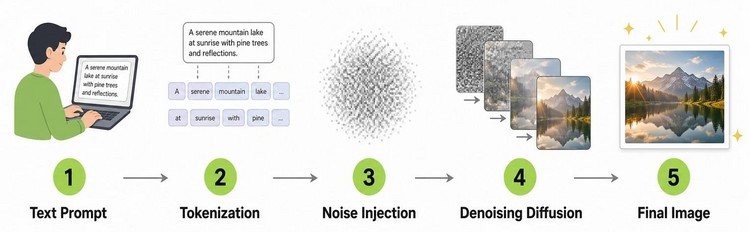
You do not need to understand advanced mathematics to start creating images with AI.
Still, knowing the basic process can help you write better prompts and understand why some results are more successful than others.
Modern image generators use machine learning models trained on large collections of visual data.
During training, these models learn patterns associated with shapes, textures, colors, objects, styles, and relationships between visual elements and language.
Many popular image generators use a technique called diffusion. Although implementations differ, diffusion models generally learn to create images by reversing a process that adds noise to visual data.
Here is a simplified explanation of the process.
The AI Learns Visual Patterns
During training, a model processes many image examples and learns statistical patterns that help it represent visual concepts.
For instance, it can learn patterns commonly associated with a mountain landscape, a wooden table, a portrait, or a watercolor painting. It can also learn relationships between words and visual features.
The model does not need to store and retrieve a finished picture for every possible prompt. Instead, it learns patterns that can be combined to generate new visual arrangements.
This is one reason AI image generation can produce an enormous variety of results from relatively short instructions.
Your Prompt Guides the Generation
When you enter a prompt, the system processes the text into a representation the model can use.
Depending on the system, this can include information about objects, actions, composition, lighting, colors, and artistic style.
Consider the difference between these two prompts:
“A forest.”
“A misty pine forest at sunrise, warm golden light filtering between tall trees, soft green tones, cinematic composition, detailed digital painting.”
The first prompt leaves many decisions open. The second provides clearer direction about the environment, lighting, color palette, and style.
A detailed prompt does not guarantee a perfect result, but it gives the model more specific guidance.
The Model Builds the Image
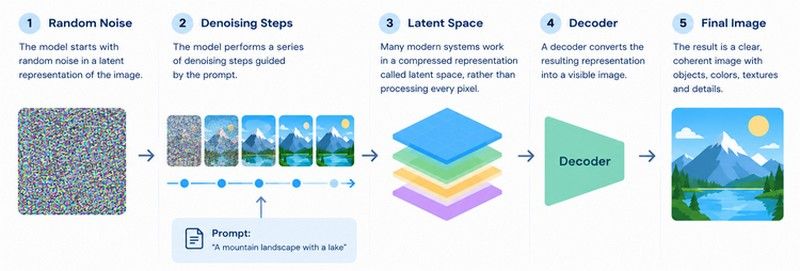
In a typical diffusion-based system, the model starts with random noise in a representation of the image. It then performs a series of denoising steps guided by the prompt.
As the process continues, the noise develops into recognizable visual structures. Objects, colors, textures, and other details gradually take shape.
Many modern systems work in a compressed representation called latent space rather than directly processing every pixel throughout the entire process. A decoder then converts the resulting representation into a visible image.
The exact architecture and generation process depend on the tool. Not every AI image generator uses the same technique.
For a more technical explanation of diffusion models, explore the Hugging Face Diffusion Models course.
The Final Image Is Generated
Once the model completes its generation process, the tool presents the result. Depending on the platform, you might receive one image, several variations, or options to refine the output.
You can then adjust your prompt, generate alternatives, edit selected areas, or increase the image resolution.
This final step is important because the first result is not always the best one. A small change in wording can produce a different composition or a more suitable visual style.
Popular AI Image Generation Tools for Beginners
There are several AI image generation tools available, and each offers a different experience.
Some focus on artistic exploration, others emphasize creative workflows, and some integrate image generation into broader design platforms.
Here are three options worth exploring.
OpenAI Image Generation
OpenAI offers image generation capabilities that can turn natural-language descriptions into images.
Depending on the product and features available to your account, you may also be able to edit images through conversational instructions.
This can be a useful starting point for beginners who prefer describing an idea in everyday language rather than learning a complicated design interface.
Explore the OpenAI image generation guide for technical information about image generation capabilities.
Adobe Firefly
Adobe Firefly provides generative AI features for creative work, including image generation and editing. Its integration with Adobe’s creative ecosystem may appeal to people who already use design and image-editing software.
It can be useful for developing creative concepts, experimenting with visual styles, and exploring variations before committing to a final design.
Review the current product information and usage terms before choosing a plan or using generated assets commercially.
Canva AI
Canva offers AI-assisted image creation within a broader visual design environment.
This can be convenient for beginners who want to create an image and then place it directly into a presentation, social media graphic, or marketing design.
Its usefulness comes from combining image creation with layout and publishing tools in one workflow.
A practical tip: Start with one tool instead of trying every platform at once. Learn how prompts affect your results, explore the available editing options, and then decide if another tool better suits your needs.
Tool availability, pricing, usage limits, and commercial terms can change, so check the official pages before starting a project.
How to Write Better AI Image Generation Prompts
The prompt is one of the most important parts of the AI image generation process. It communicates your idea and helps guide the model toward the result you want.
You do not need to write a long paragraph every time. The goal is to provide useful details without making the instructions unnecessarily complicated.
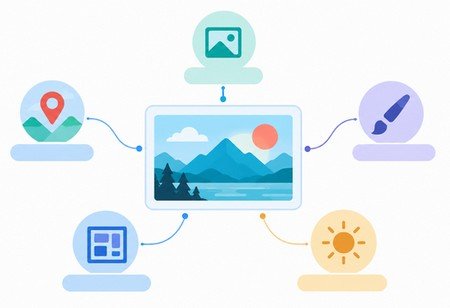
A helpful prompt usually includes several elements.
- Subject: What should the image show?
- Setting: Where does the scene take place?
- Style: Should it look like a photograph, vector illustration, watercolor, or 3D render?
- Composition: How should the main elements be arranged?
- Lighting and colors: Should the image feel bright, dramatic, warm, or subdued?
- Technical requirements: Do you need a particular aspect ratio, background, or image orientation?
For example, imagine you are creating a featured image for a blog post about website image optimization.
A basic prompt might be:
“An image about website image optimization.”
A more useful prompt could be:
“Create a minimalist flat vector illustration representing website image optimization. Show a large image file passing through a compression process and becoming a smaller optimized image, with simple browser and speed icons. White background, clean geometric shapes, limited teal and blue accents, professional editorial style, balanced composition, no text, no logos, wide 16:9 layout.”
The second prompt provides a clearer visual direction and establishes practical design requirements.
Improve Your Results One Step at a Time
When the first image is not quite right, identify the specific problem before rewriting everything.
If the composition feels crowded, request more negative space. If the colors are too strong, ask for a softer palette. If the output looks too realistic for a technical blog, specify a flat vector illustration instead.
You can also request variations to compare different approaches.
This process is often more effective than starting from scratch after every imperfect result. Think of prompt writing as a creative conversation: you provide direction, evaluate the output, and refine your instructions.
Common AI Image Generation Mistakes to Avoid
AI image generation is accessible, but getting a professional-looking result still takes some judgment. Beginners often encounter a few predictable problems.
Learning to recognize these issues can save time and make the image creation process much smoother.
A few small changes to your prompts and workflow can often make a noticeable difference in the final result.
Writing Prompts That Are Too Vague
A prompt with only one or two general words gives the model considerable freedom.
That can be useful for brainstorming, but it may not produce the precise composition you need for a website or marketing campaign.
Describe the main subject, visual style, and most important details first. Adding a little context can help the AI better understand the purpose and mood you want to achieve.
The more clearly you communicate the key visual elements, the easier it becomes to guide the generated image toward your intended result.
More information to help you write better prompts – Image Generation Models Prompting Guide.
Adding Too Many Conflicting Instructions
More detail is not always better. Asking for a minimalist design with dozens of decorative objects, multiple artistic styles, and several competing focal points can lead to a confusing result.
Prioritize the most important requirements and keep the instructions consistent. Give the AI a clear visual direction instead of trying to describe every possible detail at once.
A focused prompt usually makes it easier to create an image that looks balanced, professional, and closer to your original idea.
Expecting Perfect Text and Small Details
Some image generators can struggle with readable text, intricate details, object relationships, and precise visual arrangements. Hands, repeated objects, tiny symbols, and complex diagrams may also contain errors.
If an image needs accurate labels, product specifications, or a precise process diagram, consider adding those elements in a design editor after generation.
For technical or educational content, verify the visual carefully instead of assuming every detail is correct.
Ignoring Image Dimensions and File Size
A beautiful image can still be unsuitable for a website if its dimensions are too large or its file size slows down the page.
Choose an appropriate aspect ratio and resolution for the intended placement. Then resize and compress the finished image when necessary.
For more guidance, explore Google’s image SEO best practices.
You can also read PixWizify’s guide to image optimization for practical ways to prepare images for online use.
How to Use AI-Generated Images on Your Website
For bloggers and website owners, AI image generation offers more than a way to create attractive visuals.
It can help make complex information easier to understand and give articles a more consistent visual identity.
For example, a technical article about image compression could include a simple illustration showing a large file becoming smaller.
A guide to visual storytelling might use a diagram showing how an abstract idea becomes a clear visual message.
The strongest images support the subject instead of simply filling space.
Create a Consistent Visual Style
Choose a recognizable visual approach for your website. You might use minimalist vector illustrations, a limited color palette, clean backgrounds, and simple geometric shapes.
Consistent styling can make articles feel connected and help readers recognize your content across different pages.
Before generating an image, decide where it will appear, what it should communicate, and how it will fit alongside the surrounding text.
Optimize Images for SEO and Performance
AI-generated images still need the same thoughtful preparation as other website visuals.
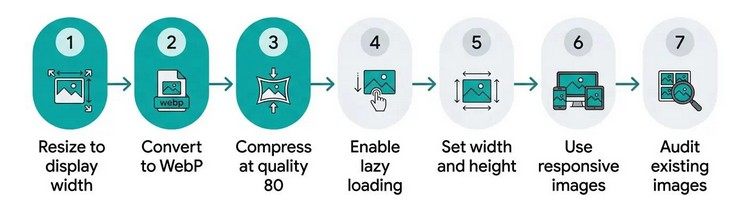
Use descriptive filenames, suitable dimensions, efficient file formats, and appropriate compression. Write alt text that explains the meaningful content of an image when it serves an informative purpose.
For example:
ai-image-generation-prompt-to-image-process.webp is more descriptive than image-final-03.webpA useful alt text might be: “Illustration showing how an AI image generator transforms a written prompt into a digital image.”
Avoid forcing keywords into every filename or alt attribute. The goal is to describe the visual accurately and help users understand its purpose.
For more guidance, consult Google’s SEO Starter Guide.
Check Image Rights and Usage Terms
Before publishing AI-generated images, review the terms and license of the tool you use. Different services have different rules concerning commercial use, subscriptions, generated content, and other restrictions.
Also consider trademarks, recognizable people, copyrighted characters, and requests that imitate specific living artists. A generated image can still raise legal or ethical concerns based on its content and intended use.
Keep a record of the tool and workflow used to create important commercial assets. For legal questions, consult a qualified professional familiar with the applicable jurisdiction.
What Are the Limitations of AI Image Generation?
Although AI image generation has become a powerful creative tool, it is not a replacement for every aspect of visual design.
A generated image may look convincing at first glance but contain details that are physically inconsistent or factually incorrect.
A historical illustration might include inaccurate clothing, while a technical visual could depict equipment incorrectly.
AI models also do not always follow every instruction precisely. You may need several attempts to achieve the desired composition, and some edits can introduce new problems.
There are also questions about data used in model training, ownership, transparency, and the impact of generated images on creative industries. These issues are still developing, and the applicable rules can differ across jurisdictions and services.
The best approach is to treat AI as a creative assistant rather than an unquestionable authority. Use it to explore ideas and accelerate parts of your workflow, then apply human judgment to accuracy, quality, accessibility, and suitability.
Your First AI Image Generation Project
The easiest way to understand AI image generation is to try a small project with a clear goal.
Start by choosing a topic you already understand. It could be a blog illustration, a social media graphic, a conceptual product image, or a simple visual explaining an everyday process.
Write a prompt that describes the subject, style, composition, and color palette. Generate an image, inspect the result, and identify one thing you would like to improve.
Then refine the prompt and compare the new result with the original.
Once you have an image you like, check the dimensions, review the details, and prepare the file for its intended use. If it is going on a website, make sure the visual adds genuine value to the page and does not unnecessarily slow it down.
You will learn much more from this short experiment than from trying to memorize every technical term before you begin.
Final Thoughts: Make AI Image Generation Work for You
AI image generation has opened up new creative possibilities for people who may not have traditional illustration or photography skills.
With a clear idea and a well-written prompt, beginners can create visuals for articles, websites, presentations, and marketing projects.
The key is understanding that good results come from more than entering a few words into a generator. Clear instructions, thoughtful iteration, careful editing, and attention to image quality all contribute to a successful result.
Start small, experiment with different styles, and learn from each generation. As your understanding grows, you will become better at translating ideas into visuals that communicate clearly and fit your goals.
AI can help you move from an idea to an image more quickly. Your creativity, experience, and judgment are what make the final result useful.