
Images are an important part of almost every modern website. They make content more attractive, help explain complex ideas, showcase products, and keep visitors interested.
But there is one problem: large image files can slow down a website, especially when visitors access it from different parts of the world.
Imagine running a website hosted on a server in Europe. A visitor from the United States opens one of your pages. Another visitor accesses the same page from Australia.
Both want to see your images, but the distance between their locations and your hosting server can affect how quickly those images arrive.
This is where an image CDN becomes useful.
An image CDN (Image Content Delivery Network) helps websites deliver images faster by distributing content through a network of servers located around the world.
Instead of making every visitor download images directly from one central server, an image CDN can deliver them from a nearby location.
But modern image CDN technology does much more than simply move images closer to visitors. It can also resize, compress, convert, and optimize images automatically, helping websites deliver the right image to the right device.
For website owners, bloggers, online stores, and digital marketers, this technology offers a practical way to improve loading speed without sacrificing visual quality.
In our guide, we explore how image CDN technology works, its main benefits, how it supports SEO, and how you can start using one on your own website.
We will also look at practical examples to make the technology easier to understand.
What Is an Image CDN?
An image CDN is a specialized content delivery network designed to store, optimize, and deliver images efficiently.
A traditional CDN distributes website files such as images, videos, CSS, and JavaScript through a network of geographically distributed servers. An image CDN takes this concept further by focusing on image delivery and optimization.
For example, imagine you have a blog post containing ten photographs. Without an image CDN, visitors might need to download all ten images directly from your hosting server.
If your hosting server is located in Sweden, a visitor in Japan may experience longer delivery times because the data has to travel a greater distance.
With an image CDN, copies of frequently requested images can be cached on servers in different regions. When someone in Japan visits your website, the CDN can deliver the images from a nearby server instead of repeatedly requesting them from Sweden.
Many image CDN services also provide automatic image optimization. This means they can create smaller image versions, adjust dimensions, and deliver modern formats such as WebP and AVIF.
The result is a more efficient image delivery process that can reduce unnecessary data transfers and improve the browsing experience.
In simple terms: An image CDN helps your website deliver images faster, in the right size and format, from a location closer to your visitors.
For a deeper technical explanation, see Google’s documentation on Cloud CDN image optimization.
How Does Image CDN Technology Work?
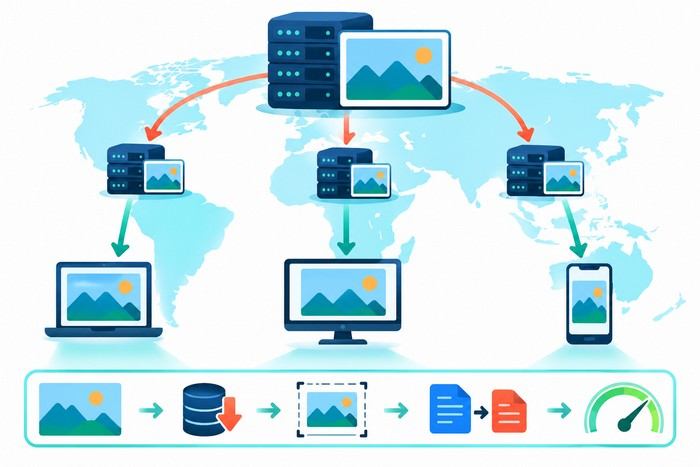
To understand the value of an image CDN, it helps to look at what happens when someone visits a website.
Every time a visitor opens a page containing, for example, social media images, the browser sends requests to retrieve those files. The images must travel from their storage location to the visitor’s device before they can appear on the screen.
An image CDN makes this process more efficient through several steps.
1. Images Are Stored on an Origin Server
The process usually starts with an original image stored on your website’s hosting server, cloud storage, or an image hosting platform.
This original file is often called the origin image.
For example, you might upload a product photograph with a resolution of 3000 × 2000 pixels. The original image remains available as the source for creating different optimized versions.
2. The CDN Receives an Image Request
When someone visits a page, their browser requests the image using its URL.
The request is directed through the CDN network rather than going straight to your origin server.
The CDN then determines which server location can deliver the requested content efficiently.
3. The CDN Checks Its Cache
A CDN cache is a temporary storage area that keeps copies of files so they can be delivered faster later.
If the requested image is already stored on a nearby CDN server, the service can deliver it directly.
This is called a cache hit.
If the image is not available in that location, the CDN retrieves it from the origin server. This is called a cache miss.
Depending on the service, the CDN may also optimize the image before storing the resulting version in its cache.
4. The Image Is Optimized
Many modern image CDN platforms can automatically modify images before delivering them.
For example, the service may:
- Resize a large image to match the visitor’s screen.
- Compress the file to reduce its size.
- Convert JPEG or PNG images into WebP or AVIF.
- Adjust image quality to balance file size and visual appearance.
- Crop images to fit specific layouts.
5. The Optimized Image Reaches the Visitor
Once the appropriate image version is ready, the CDN delivers it to the visitor’s browser.
The browser displays the image without needing to download an unnecessarily large original file.
This process can happen automatically, allowing website owners to manage one original image while delivering several optimized versions.
Main Benefits of Using an Image CDN
An image CDN can make a noticeable difference to websites that contain many photographs, product images, illustrations, or other visual content.
The biggest advantage is that it improves image delivery while reducing the amount of work required from your main hosting server.
Let’s look at the most important benefits.
Faster Image Loading Around the World
Website speed is important for visitors in every country. However, geographical distance can affect how quickly files travel between a server and a visitor’s device.
An image CDN helps solve this problem by using distributed edge servers.
For example, a website hosted in Germany can deliver images to visitors in the United States through a nearby CDN location. Visitors in Asia can receive the same content from a different location.
This reduces the distance that image data needs to travel and can improve loading times.
Amazon CloudFront is one example of a service that uses a worldwide network of edge locations to deliver website content. You can learn more in the Amazon CloudFront documentation.
Smaller Image Files Without Sacrificing Quality
Large images are one of the common reasons websites become slow.
A photograph for a blog uploaded directly from a modern camera or smartphone can easily be several megabytes in size. Displaying that original file on a small mobile screen is often unnecessary.
An image CDN can automatically compress images and create smaller versions for different display areas.
For example, imagine you upload a photograph that is 2 MB in size. An image optimization service might create a compressed version that is considerably smaller while keeping the photograph visually clear.
The actual savings depend on the original image, format, quality settings, and compression method.
Smaller files require less bandwidth and can be downloaded faster, particularly on mobile connections.
Automatic Image Resizing
A desktop monitor, tablet, and smartphone have different screen dimensions.
Serving the same large image to every device wastes bandwidth and can slow down smaller devices.
An image CDN can create different image dimensions from a single original file.
| Display Purpose | Suggested Image Width |
| Small thumbnail | 300 px |
| Blog content | 800 px |
| Large content image | 1200 px |
| Desktop hero image | 1600 px |
These are illustrative sizes, not fixed requirements. The best dimensions depend on your website layout and the actual rendered image size.
Instead of manually creating four separate image files, an image CDN can generate the appropriate version when requested.
This is especially useful for websites with large image libraries.
Cloudflare explains how its image service uses responsive image techniques and URL parameters to deliver images at appropriate sizes.
Better Website Performance
Images often account for a significant part of a webpage’s total download size.
When images load faster, the rest of the browsing experience can improve too. Visitors can see important content sooner, navigate more comfortably, and spend less time waiting for pages to finish loading.
One important performance metric is Largest Contentful Paint (LCP). It measures how quickly the largest visible content element appears on the screen.
Google recommends an LCP time of 2.5 seconds or less for a good user experience.
An image CDN can help improve this metric when the main content image is the element delaying the page. However, other factors, including server response time, JavaScript, and CSS, also affect LCP.
Reduce Bandwidth and Server Workload
When your website receives many visitors, image requests can create a significant amount of traffic.
Without caching, your origin server may need to send the same image files repeatedly.
An image CDN reduces this workload by keeping frequently requested images in its cache.
Once an image is available on an edge server, later requests can often be handled without contacting your main hosting server.
This can reduce origin bandwidth usage, improve scalability, and help your website handle traffic increases more efficiently.
A Better Experience for Mobile Visitors

Mobile visitors often use slower or less stable internet connections than desktop users.
Delivering large desktop-sized images to mobile devices can waste considerable amounts of data.
An image CDN can automatically resize images to suit smaller screens and deliver more efficient formats.
This means visitors can enjoy clear photographs and illustrations without downloading unnecessarily large files.
For bloggers and online stores, this can be particularly valuable because many people browse websites directly from their phones.
How Image CDN Technology Improves SEO
Website owners often ask how an image CDN affects search engine optimization.
The important thing to understand is that an image CDN is not a direct Google ranking shortcut. Simply moving images to a CDN does not guarantee better search positions.
However, it can support several important aspects of technical SEO.
Faster Loading Times
Page speed influences the overall user experience.
When visitors can access your content quickly, they have a smoother browsing experience. Faster image delivery can also help improve LCP when an image is the main content element.
Good Core Web Vitals are recommended by Google as part of providing a positive page experience. Google for Developers
Better Mobile Performance
Google uses mobile-first indexing, so mobile versions of your pages are important for search visibility.
Optimized images help reduce unnecessary downloads and make pages more comfortable to use on smaller screens.
An image CDN combined with responsive image techniques can help ensure visitors receive appropriately sized images.
Improved Image SEO
Image optimization involves more than file compression.
You should also use descriptive filenames, relevant ALT text, and appropriate image placement.
For example, instead of uploading an image named:
IMG_20261112.jpgUse a more descriptive filename:
image-cdn-global-delivery.jpgYou should also write meaningful ALT text that describes the actual image.
Google provides detailed recommendations in its Image SEO best practices guide.
Better User Engagement
A fast website makes it easier and creates better user engagement for visitors to explore your content.
For example, an online store with optimized product photographs can provide a smoother browsing experience. A blog with properly sized illustrations can make articles easier to read.
These improvements support your website’s overall quality, even though an image CDN alone cannot guarantee higher rankings.
Image CDN vs. Traditional CDN: What’s the Difference?

An ordinary CDN and an image CDN share the same basic purpose: delivering website content efficiently.
The main difference is the level of image-specific functionality.
A traditional CDN primarily focuses on caching and distributing existing files. An image CDN adds specialized tools for resizing, compression, format conversion, and image manipulation.
| Features | Traditional CDN | Image CDN |
| Global content delivery | Yes | Yes |
| Image caching | Yes | Yes |
| Automatic resizing | Depends on service | Commonly available |
| Image compression | Depends on service | Commonly available |
| WebP and AVIF conversion | Depends on configuration | Commonly available |
| Responsive image delivery | Requires configuration | Often supported |
| Image transformations | Usually limited | Specialized features |
There is some overlap between the two technologies. Many modern CDN providers offer image optimization as an additional feature.
For example, Cloudflare provides both general content delivery and dedicated image optimization capabilities.
The right choice depends on how much control you need and how many images your website serves.
Popular Image CDN Services Worth Exploring
Several providers offer image delivery and optimization features. The best option depends on your budget, technical experience, website platform, and image requirements.
Here are three services worth investigating.
Cloudflare Images
Cloudflare Images provides image hosting, resizing, optimization, and global delivery.
It can automatically create optimized image versions and deliver formats such as WebP and AVIF when supported by the visitor’s browser.
It is worth exploring if you want to simplify image management without manually creating multiple versions of every photograph.
Cloudinary
Cloudinary offers a broader media management platform with image transformations, optimization, storage, and delivery.
It is particularly interesting for websites and applications that manage large numbers of product images, photographs, and other visual assets.
Amazon CloudFront
Amazon CloudFront is a global CDN that distributes website content through edge locations.
It can deliver images stored in Amazon S3 or other configured origins. Image optimization can be added through integrations and image processing workflows.
It is a useful option for businesses already using Amazon Web Services.
How to Set Up an Image CDN on Your Website

Getting started with an image CDN does not have to be complicated. Many services provide dashboards, WordPress CDN plugins, APIs, or integrations that make the process easier.
The exact setup depends on your hosting provider and website platform, but the general process is similar.
Here is a practical example of how you can approach it.
Step 1: Choose an Image CDN Provider
Start by selecting a provider that matches your requirements.
If you run a small blog, you may only need basic image optimization and caching. A large online store might need advanced image transformations, automatic resizing, and more control over image delivery.
Before choosing a provider, consider:
- How many images your website serves.
- How much image traffic you receive.
- Available storage and bandwidth limits.
- Supported image formats.
- Integration with your website platform.
- Pricing and additional transformation costs.
Do not pay for advanced features you are unlikely to use.
Step 2: Connect Your Website or Image Storage
After choosing a provider, connect your website to its image delivery service.
Depending on the platform, this might involve changing DNS settings, configuring a CDN distribution, connecting an image storage location, or installing a plugin.
For example, Cloudflare Images supports two general approaches.
You can use its optimization features with images stored on an existing server or storage service. Alternatively, you can upload images directly to Cloudflare Images and use its hosting and delivery features.
You can find the relevant setup instructions in the Cloudflare Images documentation.
Step 3: Enable Automatic Image Optimization
The next step is to configure how your images should be processed.
For most websites, it makes sense to begin with:
- Automatic format selection.
- Image compression.
- Responsive image resizing.
- Appropriate image quality.
- Image caching.
For example, you can configure your image CDN to deliver WebP or AVIF versions when supported by the visitor’s browser.
The original image remains available, while the CDN creates more efficient versions for delivery.
Step 4: Update Your Image URLs
Some image CDN services require you to replace your original image URLs with CDN URLs.
Others can automatically rewrite image URLs or provide plugins that handle the process.
Here is a simplified example.
Original image URL:
https://example.com/wp-content/uploads/product-photo.jpgExample CDN image URL:
https://images.example-cdn.com/product-photo.jpgThe second URL represents an illustrative CDN setup, not a real working service address.
With an image transformation service, the URL might also contain parameters for resizing and compression.
For example, Cloudflare uses a URL structure like this:
https://example.com/cdn-cgi/image/width=800,quality=80,format=auto/wp-content/uploads/product-photo.jpgThis example requests an image with a maximum width of 800 pixels, quality set to 80, and automatic format selection.
The actual URL must match your domain configuration and enabled Cloudflare features.
Step 5: Test Your Website
Once everything is configured, test your website on desktop and mobile devices.
Check that images appear correctly, pages load properly, and the CDN delivers the expected image versions.
You should also check your website using:
Pay particular attention to image loading times, file sizes, LCP, and any unexpected layout changes.
Practical Example: Optimizing a Blog Image With an Image CDN
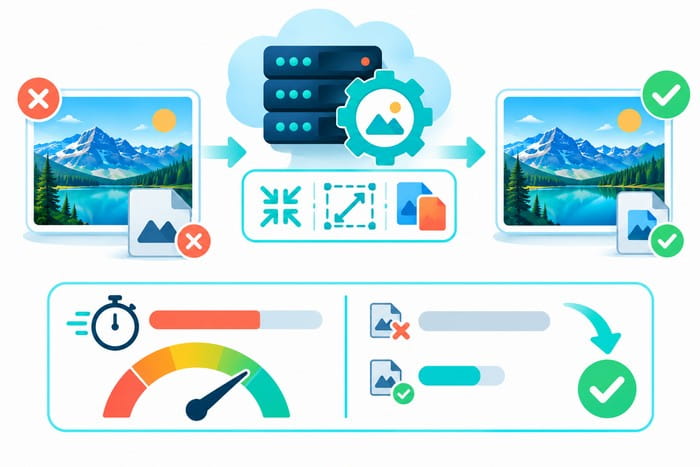
Let’s look at a simple example.
Imagine you run a blog with hundreds of articles. Each article contains several photographs and illustrations.
You upload a featured image with these properties:
| Property | Original image |
| Dimensions | 2400 × 1600 pixels |
| Format | JPEG |
| File size | 1.8 MB |
| Intended use | Blog featured image |
The image looks excellent, but it is larger than most website layouts need.
You decide to use an image CDN to create an optimized version.
Your settings might look like this:
| Optimization settings | Example |
| Width | 800 pixels |
| Format | WebP |
| Quality | 80% |
| Compression | Enabled |
| Caching | Enabled |
The CDN generates an optimized version of the original image.
Let’s say the resulting file is 150 KB instead of 1.8 MB.
The exact result depends on the image content, format, and compression settings. Some images will save more than others.
The important point is that you do not need to manually create and upload a separate image for every screen size.
One original image can serve as the starting point for several optimized versions.
A Simple Responsive Image Example:
If your CDN supports image transformations, you can use responsive image URLs with the HTML srcset attribute.
Here is a simplified example:
<img
  src="https://example.com/image-400.jpg"
  srcset="
    https://example.com/image-400.jpg 400w,
    https://example.com/image-800.jpg 800w,
    https://example.com/image-1200.jpg 1200w
  "
  sizes="(max-width: 600px) 100vw, 800px"
  width="800"
  height="533"
  alt="Optimized image delivery using an Image CDN"
>
The browser can select an appropriate image based on the available screen space and device characteristics.
For example, a smartphone might download the 400-pixel version, while a larger screen might use the 800-pixel version.
The actual choice also depends on device pixel density and browser behavior.
This approach helps avoid sending unnecessarily large images to smaller devices.
You can learn more about responsive image implementation in Cloudflare’s responsive image guide.
Does Every Website Need an Image CDN?
Not necessarily.
An image CDN can be particularly useful for websites with many images, international visitors, large media libraries, or substantial image traffic.
However, a small website with only a few optimized images might not need a dedicated image delivery service.
If your website is already fast and your hosting provider offers effective image optimization and caching, the additional benefits may be limited.
Before making a decision, look at your current website performance.
Check your largest image files, loading times, mobile experience, and hosting limitations.
An image CDN should solve a real performance problem rather than simply add another service to your website.
How to Measure the Performance of Your Image CDN
After implementing an image CDN, you should monitor its performance regularly.
Simply installing a service does not guarantee that your website has become faster. You need to compare the results before and after implementation.
Here are some important things to monitor.
Largest Contentful Paint (LCP): Check how quickly the largest visible content element loads. If this is a large featured image, image optimization may help.
Image file sizes: Compare the original files with the optimized versions delivered by your CDN.
Cache hit ratio: Monitor how often image requests are served directly from the CDN cache instead of your origin server.
Bandwidth usage: Look for reductions in the amount of data transferred from your main hosting server.
Mobile performance: Test your website on mobile devices and slower network connections.
You can use Google PageSpeed Insights to identify performance problems and Google Search Console to monitor your website’s Core Web Vitals.
Remember that an image CDN is one part of a larger performance strategy. Hosting quality, page design, JavaScript, CSS, and other resources also influence loading times.
Final Thoughts: Why Image CDN Technology Matters
Images make websites more engaging, but they can also become a major source of slow loading times.
This is especially important for websites that publish large numbers of photographs, illustrations, product images, and other visual content.
An image CDN provides a practical solution by combining global content delivery with image optimization. It helps websites deliver smaller, appropriately sized images from servers closer to their visitors.
For bloggers, online stores, businesses, and content creators, this can mean faster pages, reduced bandwidth usage, and a better experience across desktop and mobile devices.
The technology is also becoming easier to implement. Services such as Cloudflare Images, Cloudinary, and Amazon CloudFront offer different ways to improve image delivery without requiring website owners to manage complicated infrastructure themselves.
Our recommendation from PixWizify is to start by reviewing your existing images. Identify oversized files, check your mobile performance, and look at your current loading times.
Then consider introducing an image CDN if your website would benefit from faster and more efficient image delivery.
You do not need to make every technical change at once. Even a few well-planned improvements can make a meaningful difference to your website’s performance.
Ultimately, faster images help create a smoother experience for visitors and give your website a stronger technical foundation.