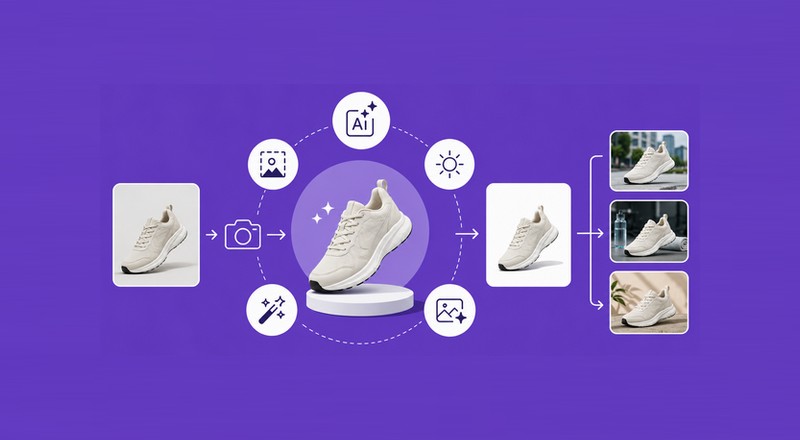
Great product photography can make the difference between a shopper scrolling past a product and stopping to take a closer look.
In an online store, customers cannot pick up a product, examine its details, or see it from different angles. Product images have to do much of that work.
That is where AI product photography is changing the game.
Artificial intelligence can help businesses create, edit, enhance, and adapt product images without requiring a large photography studio or an extensive post-production team.
AI can remove distracting backgrounds, create new environments, improve lighting, expand an image, generate variations, and prepare visuals for different marketing channels.
The technology does not eliminate the value of good photography. Instead, it gives photographers, store owners, marketers, and creators more ways to get better results from the images they already have.
For small businesses especially, this can be a practical way to produce professional-looking e-commerce images while saving time and reducing repetitive editing work.
10 Ways How AI Can Improve Product Photography for Better E-Commerce Results
Create Professional Product Backgrounds
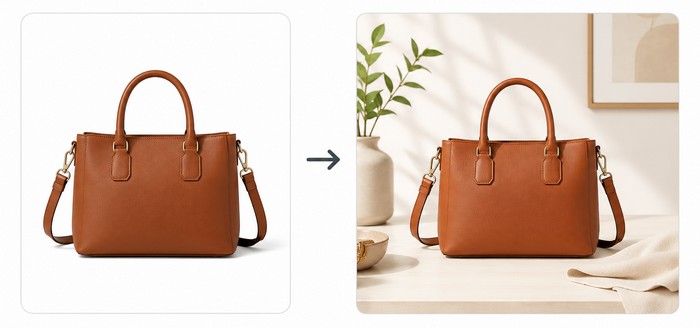
The background around a product can completely change an image’s appearance.
A plain background works extremely well for product listings because it keeps attention on the item.
A lifestyle background, on the other hand, can help shoppers imagine how the product might look in a real environment.
AI makes both much easier to create.
Instead of organizing another photography session for every new scene, an AI image tool can place an existing product photo into a new environment.
A skincare bottle could appear on a clean bathroom counter. A coffee mug could be placed on a cozy kitchen table. A pair of sunglasses could be shown on a sunny beach.
Tools such as Adobe Firefly provide AI-generated backgrounds and generative editing features that can combine an existing product image with a newly created scene.
Remove Distracting Backgrounds
Background removal is one of the most practical uses of AI for product photography.
Manually cutting a product away from its background can take considerable time, especially when an image contains complicated edges, transparent materials, hair, fabric, or small details.
AI background removal tools can automate much of this process.
For example, Canva uses AI to isolate products and create clean backgrounds for e-commerce photography. This can be particularly useful when a store needs consistent product images across a large catalog.
A transparent product image can then be placed on a white background, colored background, promotional design, or AI-generated environment.
The key is to preserve the actual product. AI should improve the presentation without changing important product characteristics.
Improve Lighting and Overall Appearance
Lighting is one of the foundations of good product photography.
Even a high-quality camera can produce an underwhelming product image if the lighting is uneven, the shadows are too strong, or the colors look inconsistent.
AI-powered editing tools can help correct some of these problems after the photograph has been taken.
Modern AI photo editors can assist with adjustments involving lighting, tone, texture, composition, and other visual elements.
Adobe Firefly, for example, includes AI-powered editing capabilities such as Generative Fill, background replacement, and other quick editing functions.
This does not mean every image should be heavily processed.
A better approach is subtle enhancement. The product should still look like the real product a customer will receive.
That point is especially important for e-commerce. Over-editing can create attractive images that give shoppers unrealistic expectations.
Generate Lifestyle Product Images
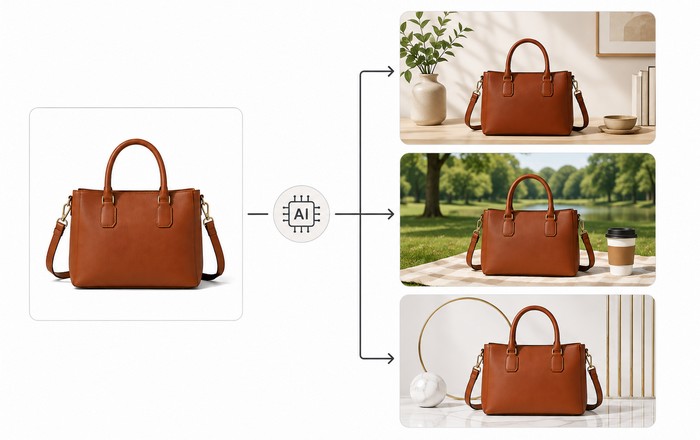
A standard product photo answers one important question: What does the product look like?
A lifestyle image can answer another: What could this product look like in real life?
That distinction can be valuable for online stores.
A sofa can be shown inside a stylish living room. A watch can appear on a person’s wrist. A bottle of skincare can be placed in a modern bathroom. A kitchen appliance can be shown on a countertop.
AI can help create these contextual scenes using an existing product photograph as the starting point.
The technology can also help you explore several visual directions quickly. Adobe describes AI product imagery workflows that can place approved products into new scenes and create different campaign variations.
Create Multiple Product Image Variations
E-commerce brands rarely need just one image.
A product may need a main listing image, close-up image, lifestyle image, social media image, advertising creative, banner image, and seasonal variation.
Creating all of these manually can become repetitive.
AI can speed up the process by creating variations from an approved source image.
For example, the same product could be presented with different backgrounds, compositions, crops, or visual themes while maintaining a consistent brand direction.
This is particularly useful for businesses managing large product catalogs.
Consistency matters here. AI-generated variations should still follow the same visual rules for colors, framing, lighting, product proportions, and brand style.
Expand and Reframe Product Images
Sometimes a product photograph is good, but the composition is wrong for the intended placement.
A website banner may need a wider image. Maybe an advertisement requires more space around the product. A social media design may need a different aspect ratio.
AI image expansion can help solve this problem.
Adobe Firefly’s Generative Expand feature, for example, can extend an image beyond its original boundaries and create additional background content.
This can save time because the original photograph does not always need to be recreated.
A useful workflow is to capture the product cleanly first and then adapt the composition for different channels during editing.
Make Product Images More Consistent
Consistency is one of the biggest challenges for online stores with many products.
Imagine a store with 300 product images. Some photographs have a gray background, others have pure white backgrounds.
Some products are centered, while others are positioned too high or too low. Lighting also varies from image to image.
The catalog can quickly start to look unprofessional.
AI-powered workflows can help standardize framing, backgrounds, lighting, and other visual characteristics across product images.
This is becoming particularly useful for larger e-commerce catalogs. Adobe’s current Firefly production workflows, for example, describe standardized packshots with consistent framing, lighting, and output formats.
For smaller businesses, the same principle can be applied manually with AI editing tools: establish a visual template and use it consistently.
Create Images Faster and Reduce Repetitive Work
Time is one of the biggest advantages of AI product photography.
Traditional product photography can involve planning, setting up equipment, arranging products, photographing different angles, transferring files, editing images.
Furthermore, removing backgrounds, correcting colors, exporting files, and preparing different versions.
AI cannot replace every part of that process, but it can reduce repetitive editing tasks.
A business might photograph a product once and then use AI to create several additional visual treatments.
That can make content production more flexible.
Shopify’s current guide to AI product photography recommends starting with a clear reference image, using detailed prompts, generating variations, reviewing the results, and optimizing the final images.
The important lesson is simple: AI works best as part of a workflow rather than as a magic button.
Prepare Images for Different E-Commerce Channels
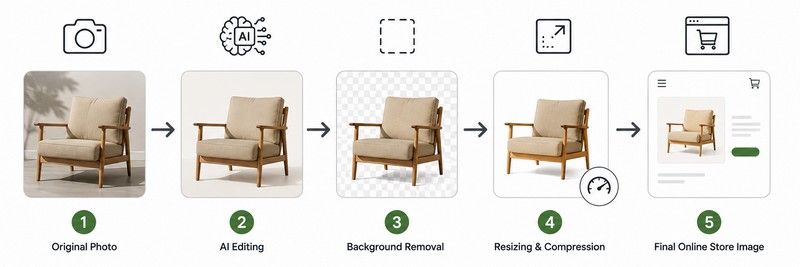
One product image may need to appear in several places.
An online store could require a square product image. A social platform might need a vertical format. An advertising campaign may require a wide banner. An email campaign may need another crop.
AI editing and image-resizing tools can help adapt the same source image to these different formats.
This can be especially helpful for marketing teams that need to produce many variations quickly.
Still, technical optimization should not be ignored.
Large image files can slow down websites, so product photography should be resized and optimized appropriately for the destination.
Shopify recommends optimizing and resizing images for web use, and its platform also performs automatic image optimization and format selection for storefront images.
For WordPress and other platforms, image optimization tools can also help reduce unnecessary file weight.
Useful image tools include TinyPNG, Squoosh, ShortPixel, Imagify, Optimole, remove.bg, Adobe Firefly, and Canva. The best choice depends on the job. A background remover solves a different problem from an image compressor or generative editor.
Improve the Complete AI Product Photography Workflow
Perhaps the biggest benefit of AI is not a single editing feature. It is the ability to improve the entire workflow.
A practical AI product photography process might begin with a real photograph of the product.
The image can then be cleaned up, separated from its background, adjusted for lighting, placed into a new environment, expanded for a different layout, resized, compressed, and prepared for publication.
This approach keeps the real product at the center while using AI to handle time-consuming creative and technical tasks.
That distinction matters.
AI-generated images should not misrepresent a product. A generated scene can make a product look more appealing, but the final image should still give customers an accurate idea of what they are buying.
Shopify emphasizes the importance of high-quality product photography because online shoppers depend on images to understand products they cannot physically examine.
AI Product Photography Still Needs a Human Eye
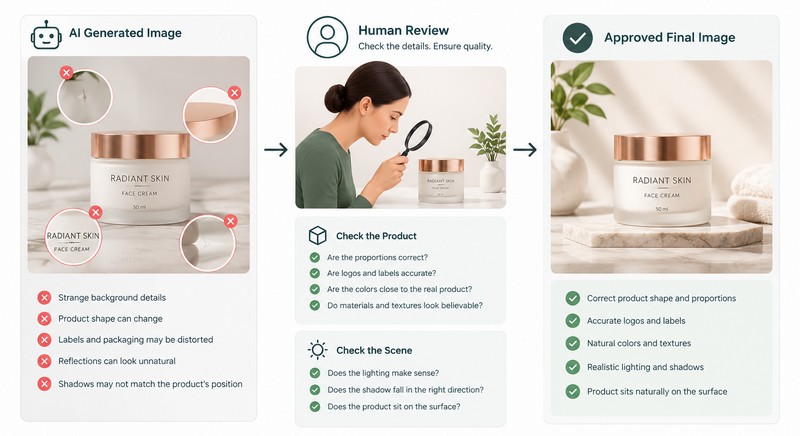
AI can do impressive things, but it should not be trusted blindly.
Generated backgrounds can contain strange details. Product shapes can sometimes change. Labels and packaging may be distorted. Reflections can look unnatural. Shadows may not match the product’s position.
That is why human review remains essential.
Every AI-generated product image should be checked carefully before publication.
Look at the product itself first. Are its proportions correct? Are logos and labels accurate? Are colors close to the real product? Do materials and textures look believable?
Then examine the scene.
Does the lighting make sense? Does the shadow fall in the right direction? Does the product actually appear to sit on the surface rather than float above it?
These small details can make the difference between a professional-looking image and one that obviously came from an AI tool.
AI Should Enhance the Product, Not Replace Reality
The strongest approach to AI product photography is often a combination of real photography and AI enhancement.
A real product photograph provides a reliable foundation. AI can then help improve the surrounding environment, remove distractions, create variations, adjust composition, and prepare the image for different channels.
This hybrid workflow offers a useful balance between creativity and accuracy.
For e-commerce brands, that balance is critical. The goal is not simply to create the most impressive image possible. The goal is to create an image that attracts attention while accurately representing the product.
Final Thoughts on AI Product Photography
AI product photography is becoming an increasingly useful part of modern e-commerce content creation.
It can help businesses create better backgrounds, remove distractions, improve lighting, generate lifestyle scenes, create image variations, expand compositions, maintain visual consistency, and speed up repetitive production tasks.
More importantly, AI can make professional-looking product photography more accessible to smaller businesses that may not have the budget for constant studio photography.
The technology is not a replacement for good products, thoughtful photography, or human creative judgment. It is a powerful tool that can make those resources go further.
For the best results, start with a clear and accurate product photograph. Use AI to improve the presentation, review every generated result carefully, and optimize the final image for the platform where it will appear.
When used thoughtfully, AI can turn a basic product photo into a flexible visual asset that works across an online store, social media, advertising, email campaigns, and other digital channels.
That is the real opportunity behind AI product photography: not simply generating prettier pictures, but creating a faster, smarter, and more flexible way to present products online.