
Images do much more than make a website look attractive. They help readers understand information, simplify complex ideas, and create a more engaging experience.
But website owners sometimes overlook another important benefit: properly optimized images can support SEO and improve search visibility.
If you want better search rankings, image optimization deserves a place in your SEO strategy. From choosing the right image format to writing descriptive alt text, every detail can contribute to a faster, more accessible, and more useful website.
Think about the last time you visited a website filled with large, blurry images that took forever to load. You probably did not want to stay long.
Now imagine visiting a page with clear visuals, helpful explanations, and images that load smoothly on your phone. The difference is easy to notice.
That is why image optimization should not be treated as a final design task. It should be part of the process from the beginning.
In our guide, you will learn how image optimization works, why it matters for SEO, and which practical steps can help your website perform better in search engines.
What Is Image Optimization in SEO?
Image optimization is the process of preparing images so they look good, load efficiently, and help users and search engines understand the content of a page.
It involves more than reducing file sizes. A well-optimized image has suitable dimensions, an appropriate file format, a descriptive filename, useful alternative text, and a clear connection to the surrounding content.
For example, imagine publishing a blog post about improving website performance. A large screenshot showing an image compression tool could help readers understand the process.
If the image is relevant, clearly labeled, and properly optimized, it can improve the usefulness of the article and help search engines interpret its visual content.
Google explains its recommendations in the official Google Images SEO best practices guide.
The goal is simple: give visitors useful visual information while making it easier for search engines to discover and understand your images.
How Image Optimization Can Help You Achieve Better Search Rankings
Image optimization does not work like a magic button. Uploading a few pictures or adding keywords to image descriptions will not automatically push a page to the top of Google.
Instead, image optimization supports several parts of a broader SEO strategy.
Faster Loading Times Improve the User Experience
Large image files can slow down a website, especially on mobile devices or slower internet connections. When a page takes too long to load, visitors may become frustrated before they reach the information they need.
Compressing images and serving appropriately sized files can reduce the amount of data a browser must download. This can make pages feel faster and help users move through your content more comfortably.
Page speed also connects to Google’s Core Web Vitals, which measure aspects of loading performance, responsiveness, and visual stability. These metrics are part of Google’s broader page experience considerations, although good scores alone do not guarantee high rankings.
To learn more, explore web.dev’s image performance guide.
A practical starting point is to review your largest images first. Your featured image, product photographs, and large illustrations may account for a substantial share of a page’s total image weight.
Descriptive Alt Text Helps Search Engines Understand Images

Alternative text, commonly called alt text, describes the information or purpose of an image. It also helps people who use screen readers understand visual content.
Consider an image showing a website owner compressing photographs before publishing a blog post.
A vague description such as “SEO image” provides very little information. A more useful description would be “Website owner compressing images to improve page loading speed.”
The second version explains what the image shows in a natural way.
Google uses alt text, page content, and visual understanding systems to interpret images. Relevant alt text can therefore help search engines understand the subject of an image and improve accessibility at the same time.
However, avoid filling every description with the phrase “Better Search Rankings.” Alt text should describe the actual image, not serve as a place to repeat your focus keyword.
For more guidance, see Mailchimp recommendations for writing image alt text.
Image Search Can Bring Additional Visitors
Not every search begins with a traditional list of blue links. Some people look for photographs, illustrations, diagrams, products, and visual examples through Google Images.
A properly indexed image can help users discover your content through these visual search experiences. When the image is associated with a relevant page, it may introduce your website to people who would not otherwise have found it.
To improve your chances, use original or genuinely useful visuals, write descriptive filenames, provide appropriate alt text, and place images near relevant text.
For example, an article about image compression could include a custom illustration comparing an oversized image with a compressed version. That visual gives readers a useful reference while making the article’s subject clearer.
Remember that indexing and visibility are not guaranteed. Search engines choose which images to show based on many signals, and image optimization is only one part of the process.
Relevant Visuals Make Content Easier to Understand
Good SEO content should help readers solve a problem. Images can make that job easier by demonstrating a process, explaining a concept, or breaking up a long section of text.
A screenshot can show readers exactly where to find an image compression setting. A diagram can explain how responsive images work. A before-and-after comparison can demonstrate the difference between a blurry image and a clear one.
These visuals add value because they answer questions that words alone might leave open.
When readers can understand your content more easily, they have a better experience. That does not mean adding images automatically increases rankings, but useful visuals can make a page more helpful and engaging.
The key is relevance. An image should have a purpose beyond filling space.
Choose the Right Image Format for Your Website
The file format you choose affects image quality, file size, and how efficiently the image can be delivered to visitors.
There is no single best format for every situation. The right choice depends on the type of visual you are publishing.
JPEG for Photographs
JPEG is a familiar format for photographs and other images containing many colors and subtle details.
It can produce relatively small files, making it useful for photography when the compression level is chosen carefully.
It is often a reasonable choice for blog photography, travel pictures, and product images.
PNG for Graphics That Need Transparency
PNG can be useful for screenshots, interface graphics, and images that require transparent backgrounds.
It can preserve sharp edges and fine details, although some PNG files can be much larger than comparable photographic images.
If a screenshot contains small interface text, check that compression has not made the text difficult to read.
WebP and AVIF for Modern Image Delivery
WebP and AVIF can provide efficient compression for many types of web images. Depending on the image and encoding settings, they can reduce file sizes while maintaining good visual quality.
For websites with many photographs and illustrations, these formats are worth considering.
SVG is another useful option for logos, icons, and simple vector illustrations because it can scale to different sizes without becoming pixelated.
The best approach is to compare file size and visual quality rather than choosing a format based on its name alone.
Compress Images Without Sacrificing Quality

Image compression reduces the amount of data needed to store and deliver an image. It is one of the most practical steps you can take when working toward better search rankings through improved website performance.
However, smaller is not always better if the result looks poor.
An overly compressed image may show visible artifacts, rough edges, or muddy colors. This can make a professional website look less trustworthy and reduce the usefulness of its visuals.
Start by resizing each image to dimensions appropriate for its display area. Then compress it and inspect the result at the size visitors will actually see.
For example, if your article displays a visual at approximately 800 pixels wide, uploading a 4,000-pixel-wide original may waste bandwidth unless the larger version serves a clear purpose.
Tools such as Squoosh allow you to compare image formats and compression settings. You can adjust the quality until you find a reasonable balance between appearance and file size.
For a repeatable workflow, compress images before uploading them or use a reliable image optimization solution that fits your website platform.
Write Descriptive Image Filenames
An image filename is a small detail that is easy to overlook. Yet a descriptive filename provides useful context about the image before someone even opens it.
Compare these examples:
IMG_8472.jpgbetter-search-rankings-image-optimization.jpgThe second filename gives a clearer indication of the subject. It is easier for a person managing a media library to recognize, and it provides a modest contextual clue to search engines.
Use short, descriptive filenames that reflect the actual image. Separate words with hyphens and avoid adding unrelated keywords.
You do not need to rename every image to include your focus keyword. If the image shows a WordPress dashboard, a filename such as:
wordpress-image-compression-settings.webpIt is more useful than forcing in a phrase that does not describe it.
Optimize Image Dimensions for Desktop and Mobile
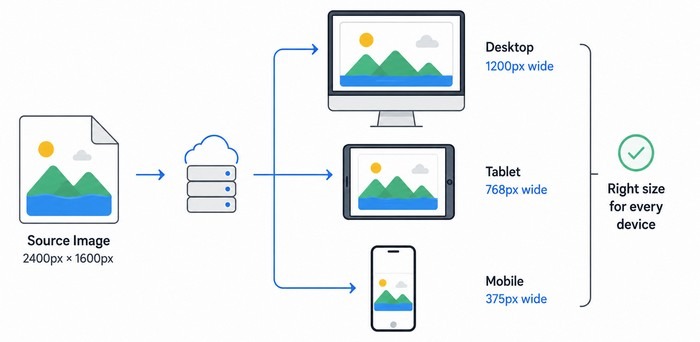
A website image should look sharp without forcing every visitor to download a larger file than necessary.
This is particularly important on mobile devices, where oversized images can use more data and take longer to download.
Responsive images allow browsers to select a suitable image size for the available display area and device. With appropriate HTML techniques, such as srcset and sizes, developers can provide multiple versions of an image so the browser can choose a suitable candidate.
For a typical blog, you might create a smaller version for a compact content area and a larger version for a wide layout or high-density screen.
You should also define image width and height, or reserve space using an appropriate aspect ratio. This helps prevent content from jumping around as images load.
That visual stability matters because unexpected layout shifts can interrupt reading and cause users to lose their place.
For technical examples, read web.dev’s guide to responsive images.
Improve Loading Performance With Lazy Loading
Not every image needs to load immediately when a visitor opens a page.
Lazy loading allows suitable images to load when they approach the visible area of the screen. This can reduce unnecessary downloads for images further down a long article.
For example, a blog post containing several illustrations can often load its lower-page visuals as the reader scrolls toward them.
There is an important exception: do not automatically lazy-load the main featured image if it is visible immediately when the page opens. That image may be a key part of the initial loading experience, and delaying it can make the page feel slower.
Use lazy loading selectively and test the results. The aim is to prioritize the content visitors need first while avoiding unnecessary delays elsewhere.
Place Images Near Relevant Content
Image optimization is not only about the file itself. The text surrounding an image can help explain its subject and show readers why it matters.
Imagine a section explaining how to compress images. A relevant screenshot should appear near the instructions for compression, not several paragraphs away from the explanation.
A descriptive caption can provide extra context when it genuinely helps readers. Headings, nearby paragraphs, filenames, and alt text should all describe the same subject naturally.
Avoid inserting unrelated stock photographs simply to make a page look longer. Each visual should support the article’s purpose.
For a website focused on image SEO, original diagrams, practical screenshots, and clear before-and-after comparisons can be more valuable than generic decorative photographs.
Create Original Visuals That Add Real Value
Original visuals can help distinguish your article from similar pages covering the same topic.
For example, you could create a simple infographic showing five stages of image optimization: choosing a relevant visual, editing and resizing it, compressing it, adding descriptive alt text, and checking its performance.
You could also demonstrate how a large image file changes after compression, provided the comparison uses genuine measurements from your own test.
These visuals give readers something concrete to learn from and can make technical concepts easier to remember.
When planning an image, ask yourself one question: does this visual explain something useful, or is it simply decoration?
A purposeful visual is more likely to improve the reader’s experience than an image added without a clear reason.
Common Image Optimization Mistakes to Avoid
Even a well-written article can lose some of its value if its images are poorly prepared. A few common mistakes are worth checking before you publish.
Uploading Images That Are Too Large: Large originals can waste bandwidth and slow down pages. Resize images to suit their intended display dimensions, and provide responsive versions when appropriate.
Repeating Keywords in Every Alt Attribute: Alt text should describe the image accurately. Repeating “Better Search Rankings” in every image description makes the text unnatural and can reduce its usefulness for screen reader users.
Choosing Quality Over Everything Else: A very high-quality image is not always the best web image if it is unnecessarily large. Find a practical balance between visual clarity and file size.
Forgetting Mobile Users: An image that looks good on a desktop may be too heavy or poorly cropped on a phone. Preview your content on smaller screens and confirm that important visual details remain clear.
Ignoring Broken Images and Indexing Issues: Make sure important images can be accessed by users and search engines. Check that image URLs work, that your robots directives do not unintentionally block important resources, and that your page can be indexed.
How to Measure the Results of Image Optimization
Once you have optimized your images, check the results rather than assuming every change has improved performance.
Google Search Console can help you review search performance, including impressions, clicks, click-through rate, and average position for relevant pages and queries. You can also examine image-search performance where the available reporting supports it.
Use Google Search Console to monitor organic search visibility over time.
For performance testing, Google PageSpeed Insights provides reports about loading performance and opportunities for improvement.
You can use the results to identify large image resources, loading issues, and other technical problems.
Compare results before and after meaningful changes, and allow enough time for search performance data to develop.
Traffic and rankings can change for many reasons, so avoid attributing every improvement or decline to image optimization alone.
A simple review routine can help you stay consistent: check your most important pages, identify the heaviest images, optimize them, test the pages again, and monitor performance over time.
Build Image Optimization Into Your SEO Workflow
The most effective image optimization strategy is one you can repeat.
Before publishing a new article, choose visuals that support the content.
Resize them to suitable dimensions, compress them without making them look poor, use descriptive filenames, and write helpful alt text when the image conveys meaningful information.
After publishing, check that the images display correctly on mobile devices and that important visuals are accessible to search engines. Review performance reports and improve the pages that need attention.
You do not need to optimize every image on your website in a single day. Start with your most important pages, particularly those that already attract visitors or support key business goals.
Over time, small improvements can add up to a more polished, accessible, and efficient website.
Final Thoughts: Use Image Optimization to Support Better Search Rankings
Image optimization is an important part of building a website that works well for both people and search engines.
It can improve loading efficiency, make visual information easier to understand, support accessibility, and help search engines interpret images.
The best results come from combining these practices with useful content, a technically sound website, and a positive experience for visitors.
If your goal is better search rankings, start with the images that matter most. Compress oversized files, choose suitable formats, write meaningful alt text, and make sure your visuals support the content around them.
You may not see an immediate ranking change after every adjustment, and no single image technique can guarantee a top position in Google.
But a consistent approach to image SEO helps create a stronger foundation for search visibility and a better experience for the people visiting your website.
Start with one page, make a few meaningful improvements, and build from there.